
Use Monitoring as Code to secure the uptime and performance of your apps, APIs, and services. Get clear signals instantly when things go sideways.
Checkly is often highlighted for its robust monitoring features, particularly its ability to ensure the uptime and performance of web applications effectively. However, some users express concerns about occasional false positives and complex configurations for newcomers. Pricing sentiment appears to be generally positive, as users find it relatively competitive and fair for the features provided. Overall, Checkly enjoys a solid reputation as a reliable tool for web application monitoring, widely appreciated in professional circles.
Mentions (30d)
82
26 this week
Reviews
0
Platforms
2
GitHub Stars
92
21 forks
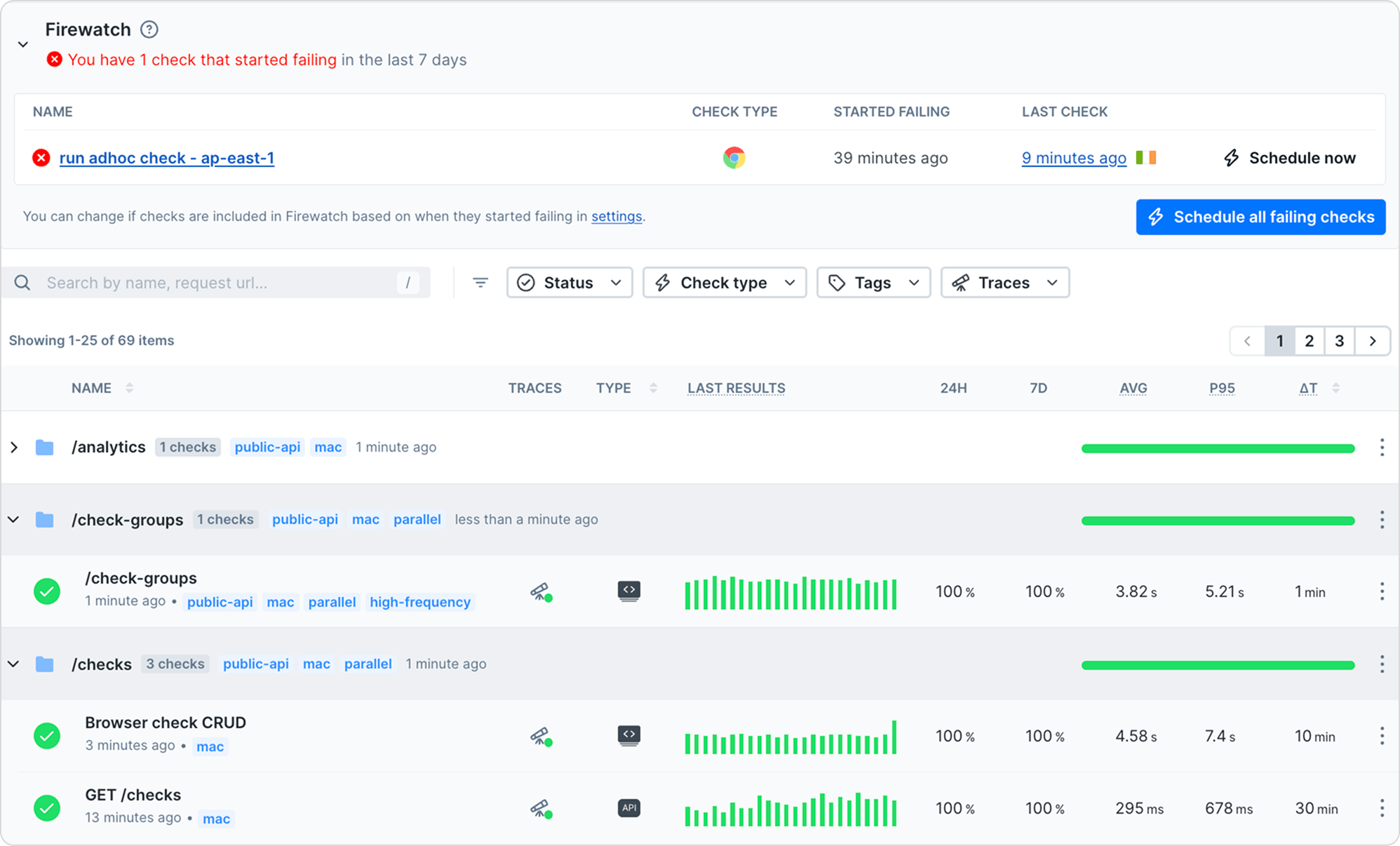
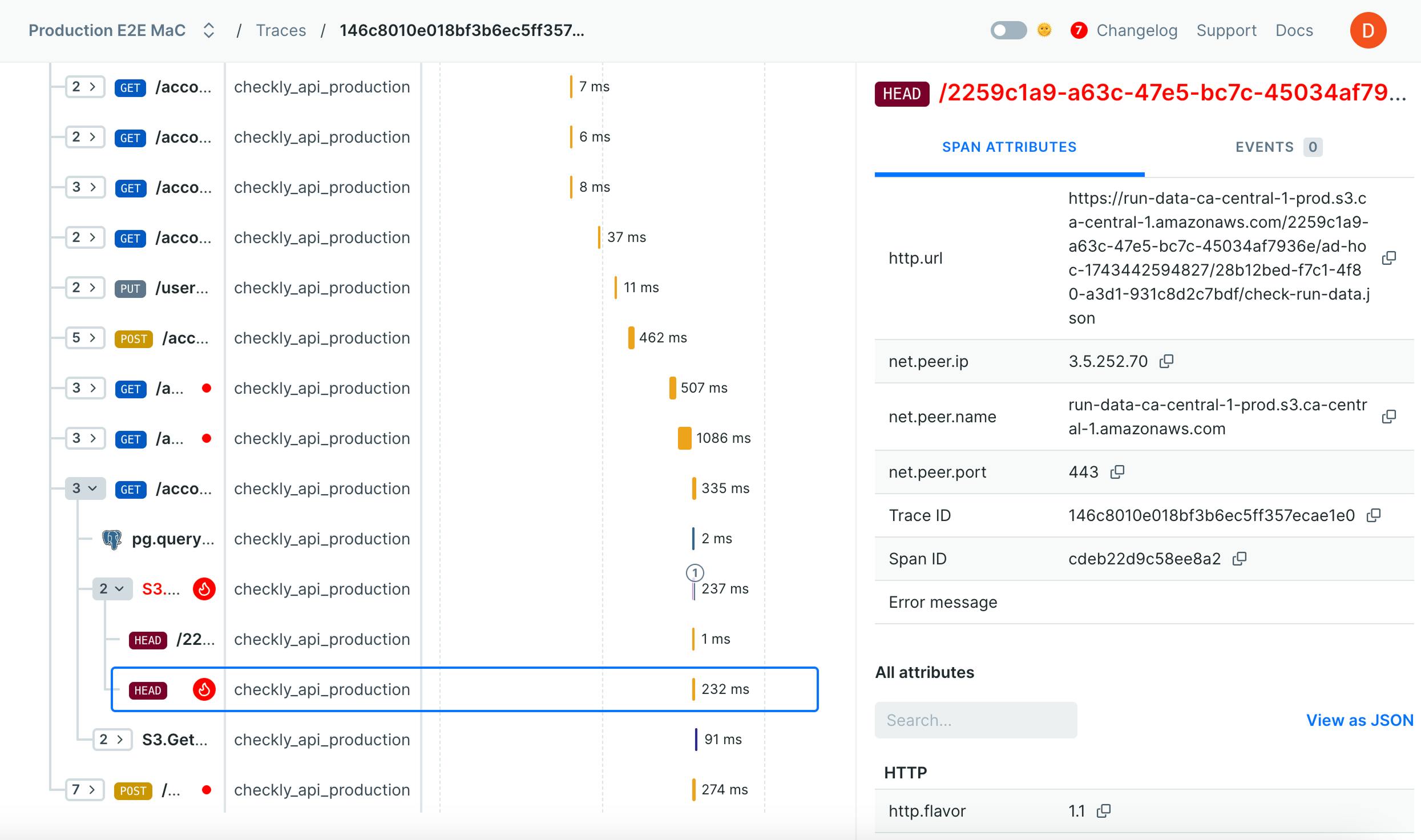
Checkly is often highlighted for its robust monitoring features, particularly its ability to ensure the uptime and performance of web applications effectively. However, some users express concerns about occasional false positives and complex configurations for newcomers. Pricing sentiment appears to be generally positive, as users find it relatively competitive and fair for the features provided. Overall, Checkly enjoys a solid reputation as a reliable tool for web application monitoring, widely appreciated in professional circles.
Features
Use Cases
Industry
information technology & services
Employees
58
Funding Stage
Series B
Total Funding
$32.3M
254
GitHub followers
74
GitHub repos
92
GitHub stars
20
npm packages
Pricing found: $8, $8, $4.00, $4.00, $6.50
Claude Status Update : Elevated errors for Claude Code in Slack on 2026-05-26T05:19:13.000Z
This is an automatic post triggered within 2 minutes of an official Claude system status update. Incident: Elevated errors for Claude Code in Slack Check on progress and whether or not the incident has been resolved yet here : https://status.claude.com/incidents/fl8sx824x72r Also check the Performance Megathread to see what others are reporting : https://www.reddit.com/r/ClaudeAI/comments/1s7f72l/claude_performance_and_bugs_megathread_ongoing/ submitted by /u/ClaudeAI-mod-bot [link] [comments]
View originalHello everyone I need help “Claude pro the monthly subscription
Is it worth it to have Claude pro I'm sick of the free version barely can last so I want to know First: is it worth it? Second: how much time does it give ? Third : is it collaborate with the project we'll not giving you hard time Caz like something Claude can be so annoying and frustrating while doing some project and publish it more then one time and then I can not do it anymore and just can open it from the phone but the Mac no even tho if haw the same account it says "Download "and it can not open So everything any thoughts and just I want to find our about this questions thank you in advance dvance submitted by /u/RecentReflection2213 [link] [comments]
View originalClaude Status Update : Elevated errors for Claude Code in Slack on 2026-05-26T01:59:21.000Z
This is an automatic post triggered within 2 minutes of an official Claude system status update. Incident: Elevated errors for Claude Code in Slack Check on progress and whether or not the incident has been resolved yet here : https://status.claude.com/incidents/fl8sx824x72r Also check the Performance Megathread to see what others are reporting : https://www.reddit.com/r/ClaudeAI/comments/1s7f72l/claude_performance_and_bugs_megathread_ongoing/ submitted by /u/ClaudeAI-mod-bot [link] [comments]
View originalI went from 1 to 10 apps on the App Store in 4 months - vibe coding as a senior iOS dev
I code for 20 years and make mobile apps for 15+. This February I decided to try vibe coding, but at scale. Back then, I had 1 app in AppStore. Now I have 10. These 4 months were intense, and many lessons were learned. 6 guidelines surfaced, here they are, in no particular order: use 2 models, one as workhorse, and the other as the verifier / backup. Sometimes I hit my Claude limit midday, which is frustrating, so I got a MiniMax 2.7 subscription too. I reckon any other decent model will do it. Claude Code does the main stuff, backup does boilerplate, fixing, review. optimize at the root. I spent A LOT more time writing specs than interacting with the model. Around app number four, I stitched together a genesis prompt template, that I started to use going forward. It has 23 sections, I open sourced it (link at the end) and it contains everything from monetization to design system. keep your mental mode light. This was an unexpected bottleneck: switching back and forth between 3-4 apps at the same time (that was my upper limit) is taxing. I had to make serious changes to how I work. I literally struggled to keep my focus. expand verification, because build shrinking. As a senior dev, I used to spend the best part of my work writing code. Now no more, Claude Code does it for me, BUT I have to double down on verification. I check especially after bug fixing and at the beginning of every app generation, to make sure the structure, file names, variables, etc. are in order. marketing starts as early as building. Before February, the main question driving my work was: "is the app done yet?" Now it's: "does anyone know about the app yet?" I started promotion, marketing as soon as the first lines of code were generated. Still learning my way around here, but it's starting to work. treat every app as an experiment. This one was a bit hard to swallow, because I'm used to the old, inertial way of doing things: bet on an app, push it and do whatever it takes, because of the sunken cost fallacy (I worked so hard to build this). Now the building is approaching zero, so pivoting / iterating is cheaper too. If you're vibe coding for a living, or at scale, I'd love to hear your comments on these. P.S. If you're curious about the 10 apps and the technical challenges I faced with each of them, as well as about the genesis prompt template, they are here, in a longer post. (It's a mix of productivity, books, utilities and fitness apps) submitted by /u/dragosroua [link] [comments]
View originalWhat is considered ‘normal’
I currently have a lot of free time and thought ‘I’ve got some projects I’ve been thinking about, fuck it I’ll buy a max subscription and just crank on them’, see what happens. Holy. fucking. shit For context I’ve used ai to help me write etc but never for full coding workflows etc. In the last week I have managed to build 1 full website (weather forecast aggregator for alpinists and skiers and others who require accurate detailed weather forecasting and avalanche conditions) and then started a research project which then immediately led into building out a trading algorithm - 12,000 lines of code, full infra, backtesting engine etc etc - currently in paper trading. With the algo especially I’m sure there are going to be some issues since I don’t have the kind of expertise to check the infra etc however it works, that’s the main thing. Is this normal productivity? Or have I just hit a bit of an anomaly? I’ve honestly been blown away by the ability of Claude. submitted by /u/DiscombobulatedElk58 [link] [comments]
View originalAnyone else dread keeping web, Android, and iOS releases in sync?
I got tired of every “small update” turning into version bumps, patch notes, store metadata, web deploys, Android uploads, TestFlight builds, and one more iOS step I couldn’t even run locally because I don’t own a Mac. I have a game built with React + Vite + Matter.js + Capacitor. It’s live on web, Android, and iOS. I was getting worn down by the release chores: version bumps, build numbers, localized patch notes, store metadata, Capacitor syncs, signing, uploads, all the little steps that are easy to mess up and also ridiculously time consuming. Also, I don’t own a Mac, so I thought iOS was out of the question... until.... I wired the repo so Claude can take a normal request like: “ship the updates since our last version bump, browser, Android, and iOS TestFlight with release notes” then the Claude code gets to work with a repeatable path: - bump the right versions/build numbers both in build and in game ui - create patch notes for every supported language - run lint/typecheck/build through `npm run verify` - sync Capacitor after the web build - build and upload iOS to TestFlight from GitHub Actions on a macOS runner - build an Android AAB and upload it to Google Play - push Apple/Google store metadata from repo files - keep release notes as workflow input instead of hand-copying them around The most satisfying part is that the game work and the release work now feel like the same conversation. I can ask for a change, get it verified, generate the release notes, and have the web/Android/iOS path ready without fiddling with a pile of one-off publishing steps. I still have to manully submit for review from the dashboards so I can double-check everything. How do you guys handle this: do your agents trigger deploys for app stores, or do they prep everything and you manually click though the dashboards? Game, mostly as proof this is a real project: Nelly Jellies submitted by /u/MightyBig-Dev [link] [comments]
View originalSpec: Version Control for AI Agent Intent
AI agents are getting good at writing code. That is not the hard problem anymore. The hard problem is coordination. When you have multiple agents working on the same codebase, who decides what gets built? How do two agents with conflicting opinions resolve a disagreement? How does a human stay in control without reviewing every line before it gets written? Git does not solve this. Git is brilliant at tracking what changed, when, and by whom. But it operates on code that has already been written. By the time a conflict shows up in Git, two agents have already done the work, made assumptions, and written implementations that may be fundamentally incompatible — not at the line level, but at the intent level. I wanted to solve the problem one layer up. Before the code. The Core Idea Every code file in a Spec project has a paired .spec file living right next to it. app/Http/Controllers/HomeController.php app/Http/Controllers/HomeController.php.spec The .spec file is a plain Markdown description of what the code file is supposed to do. It is the source of truth for intent. Agents do not write code directly — they write proposals against the spec. The code only gets written once every agent has explicitly agreed on what it should do. The spec is never “checked out.” It has one canonical state at any moment. Agents read it, propose changes to it, and debate those proposals. When all agents agree, the session locks, the spec is updated, and only then does an implementer generate the code. Code is always the output of consensus. Never the battleground. The Flow A typical session looks like this: An agent reads the current spec and submits a proposal with reasoning attached. Not just what they want to change, but why. A second agent reads the proposal and responds — accepting it, rejecting it with specific objections, or suggesting modifications. If they get stuck, a mediator surfaces the contradiction and helps them find common ground. The mediator has no vote and no authority — it just asks better questions. When every agent has explicitly agreed on the same spec state, the session locks. An implementer reads the locked spec and writes the code. One pass. From a fully agreed specification. This means a few things that feel unusual at first: A build is never produced from a broken or partial spec. If agents cannot agree, nothing gets built. That is a feature, not a bug — better to surface the disagreement at the intent level than to discover it six files deep in an implementation. Conflicts in Spec are semantic, not syntactic. Two agents can touch completely different parts of a spec and still be contradictory. One says the controller should cache responses for 60 seconds. The other says it should always fetch fresh data. No line conflict. Completely incompatible intent. Spec is designed to catch this before a line of code is written. Every message carries reasoning. Proposals alone are not enough. The full session log — with reasoning trails — is what keeps the human comfortable staying hands-off. The Human Role The human operates at what I call a god level. You provide the original request. You can observe at any granularity — project, session, agent, or individual message. You can intervene at any point: rewrite the spec, stop a session, override an agent, shut the whole thing down. And critically, every intervention you make becomes a lesson — captured with full provenance and fed back into future sessions so the system learns from it. The goal is not to remove the human from the loop. It is to move the human up the stack. Mission commander, not task manager. You set the intent. The agents work out the details. You intervene when they get it wrong, and the system gets smarter from each intervention. The Technical Details Spec is built in Rust. Three dependencies: serde, serde_json, and tokio. LLM calls go over raw HTTP via curl — no SDKs. The provider layer is deliberately abstract. Agents, the mediator, and the implementer all talk to the same interface. Swap the provider in config and nothing else changes. Different agents can run on different models. You can run fully local with Ollama for cost control or privacy. Agent identity is explicit. You set SPEC_AGENT_ID before running commands. Without it, Spec errors with a clear message. This is intentional — the system cannot coordinate identity automatically, and a silent fallback to hostname:pid would make consensus unreachable in practice. The lesson graph lives at: ~/.spec/lessons.json It lives outside the repo entirely. Lessons accumulate across all projects and branches. Check out an old branch and you do not lose what the system has learned. Lessons are knowledge about how your agents work, not knowledge about any particular codebase. A hook system lets you plug in your own behavior at defined lifecycle points: • post-agree: fires when a session locks • post-build: fires after code is written • pre-release: fires befor
View originalBuilding a personal AI Chief of Staff on Telegram — 7 real problems, looking for advice
I've been building a personal AI assistant for the past few months — not a chatbot wrapper, but something that actually manages my workload, tracks client relationships, processes meeting transcripts, handles task management, and proactively tells me what to focus on. It lives in Telegram so I can use it from anywhere. Happy to share what's working. But I'm hitting real walls and want honest input from people who've built similar things. What I have today (context Moved away from multi-agent routing (too rigid for natural conversation) → one capable agent with full history.) Stack: Python Telegram bot as the frontend Claude (Sonnet) as the brain via API — single conversational agent with full tool access Integrations: Notion (tasks/goals), Google Calendar, Gmail, meeting transcription tool, customer support platform, Google Chat File-based context system: each "project" or relationship has its own markdown files (readme + activity log) that the agent reads on demand Skills defined as markdown spec files that the agent loads per use case (morning briefing, meeting processing, email drafting, weekly review) Conversation history kept in memory (last 20 messages per session) What actually works: Natural conversation with full tool access — ask anything, agent decides which tools to use Meeting processing: drops a transcript link, agent extracts decisions, action items, saves structured brief Morning briefing on demand: tasks, calendar, open support tickets, suggested focus Drafting messages for any channel with the right tone Creating and updating tasks with natural language 7 problems I haven't solved: 1. No memory between sessions History is in-memory. Bot restarts = full amnesia. The agent has no idea what we discussed yesterday unless it's written in a project file. Thinking of a hot_context.md that gets written at session end with TTL — but feels hacky and depends on the agent being disciplined about writing it. 2. Purely reactive Only responds when I message it. I want it to send me a morning briefing at 9am without me asking, alert me when a client relationship goes quiet, run a weekly loop-killer on Friday. The infra is there (job scheduler). The question is what format actually makes you read a proactive message vs. dismiss it as noise. 3. Can't tell if I'm avoiding something or actually blocked I procrastinate differently by task type — technical tasks I attack immediately, tasks with human dependencies (waiting on someone, uncomfortable follow-ups) I let sit for weeks. I want the agent to detect the pattern and call me out. The challenge: how do you prompt for real accountability without the agent turning into an annoying nag? 4. No closure ritual I'm good at creating tasks, terrible at killing them. The list grows forever because nothing forces a binary decision. Want a weekly "kill or commit" where everything open >7 days gets a date or gets deleted. Not sure if this works better as an automated message or an on-demand command. 5. Context loading blind spots Each client/project has a markdown file the agent reads on demand. Works great when I explicitly mention a client. Falls apart when I ask "what should I focus on this week?" — the agent doesn't know to proactively check which relationships have been neglected. 6. Hosting kills the file sync Running locally means the bot dies when my laptop closes. Moving to a VPS — but then my markdown context files live on the server, not my machine. Now every manual edit requires a push, every agent update requires a pull. Is git the right sync layer here or is there a cleaner approach? 7. Context files go stale Client files have sections for current status, last contact, open items. The agent appends logs but doesn't maintain the top-level summary. Two months in, files are half-accurate — some sections fresh, some outdated. Is the answer agent discipline (always update on write), user discipline (manual cleanup), or periodic jobs? What's your experience with any of these? submitted by /u/GOA05 [link] [comments]
View originalSome obsidian + Claude code
I'm trying to get a massive novel (~2800 chapters) and all the systems in it inside a new TTRPG system and even though it by definition is not a usual case for Claude code but it is the only good way to do it... Atp I have made 1/3 of it being 4.3mb of pure text in 2.5 weeks. The reason why I'm posting being... I don't know if there's really better way to do what I do than just 6 steps thing 1- I do a full canon dump myself from every single trustable source, add some notes etc. 2- Opus reads and interprets it with a prompt "Strictly follow the canon" 3- He creates a structured by a template that we (myself & opus) created for the thing we're doing at the moment 4- He checks for any hallucinations that don't follow the canon and fixes them 5- He checks yet again, this time — for readability and grammar (this is crucial because I write it in a different language than English) 6- I myself reread the final version myself, redacting minor inconsistencies and mistakes. Is there any kinda way to optimize it and not get worse quality? submitted by /u/Silly_lily69 [link] [comments]
View originalBuilt a Claude Meeting Assistant Plugin
I had the itch to build something… works great for me so sharing in case someone else here can benefit. Built with claude, for claude. And yes, it's free. my entire job (product manager) is constantly referencing every context channel we have (slack, emails, CMS, Github, Linear, etc.) --> scoping features, resource planning, digging up those tiny details the stakeholders mentioned they needed… Claude works great as my command center with all the connectors. But the most critical juncture of needing all this is IN my team meetings. what I tried: Granola, Firefly, etc: all just notetakers, no actual in-meeting action Gemini: our team is on Claude/Claude Code, it’s what everyone is used to, and can’t afford another company AI subscription Meeting participant bots: a bot having its own participant window felt intrusive and like we were being watched Claude but outside the meeting: our team is entirely remote and I need our team present during these meetings. I am strongly against having other tools open during meetings unless we absolutely have to. my solution: I created a Claude plugin that lets me dial-in my Claude, so I can have all my MCP’s, skills, connectors, and context available in the chat panel of the meeting, available to the whole team No more I’ll check and we can schedule a follow-up No more spending meeting time looking something up No more list of misc to-do’s post-meeting Everything can be ascertained and delegated in the meeting, by all participants so meetings are actually productive and everyone leaves with zero tedious follow-ups features: Claude can reference both what was discussed in the current meeting as well as chat messages live + historical records of meetings of course Two modes: DIAL which is where you can "@claude" in the chat panel to ask/delegate and WIRETAP which is just recording meeting + chat messages Everything is spawned directly from wherever you Claude Code - meaning your chat before you dial in claude gets loaded in as context (I typically set an agenda/reminders or just use it for prep) and after the meeting you can debrief/recap in the very same chat session Meeting data lives on your machine and your machine only Yes, it uses your subscription and NOT the API; we are within anthropic’s TOS here. Just had to be creative about it limitations: Claude replies under your name but with a visible prefix (see demos below) The plugin opens its own version of a chrome browser to get Claude in there with you FYI Mac only — linux/windows next Google meet only — teams/zoom next Claude only — I want to add codex, openclaw, and local LLMs next How it's going for us now... we got rid of our Granola subscription which we love but was getting costly for us, and I just want less UI’s in my life tbh. So it’s worked great for us so far. Some demos below - give it a spin and give me some feedback if you want! GitHub repo: https://github.com/1-800-operator/operator/fork quickstart run in terminal: # 1. One-line install — sets up the / slash commands curl -fsSL 1-800-operator.com/install | bash # 2. Open Claude Code and type: /dial https://meet.google.com/xxx-yyyy-zzz # 3. Go further — more slash commands: /dial-yolo # no asks, full speed /wiretap # just record, no bot https://i.redd.it/qp998satxc3h1.gif https://i.redd.it/afjsve8yxc3h1.gif submitted by /u/unpopular_parsnip [link] [comments]
View originalI got AI to compile a music production course. Anyone proficient in music care to check it out?
Hello, I am very new to AI AND music production. I want to learn how to create music and i don't really know much of anything in the realm. So I enrolled in several courses for music production thru Udemy. I was kind of jumping around the courses aimlessly and then I realized I need more structure. The courses include an ableton mastery course, audio engineering, music theory, piano lessons, mixing, mastering and synthesis. The compiled course includes daily lessons and exercises starting from complete novice fundamentals to professional mixing. The course should take about a year. I would post in a music production subreddit but I think i would get a lot of hate. The agent won't be producing any music for me. I only wanted it to make this course. So if anyone that is proficient in music feels up to double checking the content you would be doing me a huge solid. Im so excited to start this new adventure! Send a DM for the Google document submitted by /u/OGgoob666 [link] [comments]
View originalStreamline your work order process. Prompt included.
Hello! Are you tired of miscommunication and confusion when handing off work orders to vendors? It can be such a headache when information gets lost or the scope isn’t clear! This prompt chain helps create a comprehensive work order handoff cover page to ensure vendors have everything they need to complete their tasks accurately with zero follow-ups. It covers all the critical information, from scope of work to safety requirements, making your life so much easier! Prompt: ``` VARIABLE DEFINITIONS [PROPERTY_NAME]=Name of property [VENDOR_NAME]=Assigned vendor or contractor Work Order Handoff Cover Page~ Property: [PROPERTYNAME] Vendor: [VENDOR_NAME] Date Issued: __________________ Target Completion Date: ___________________ Primary Contact (PM): ___________________ PM Phone / Email: ___________________ Purpose Provide [VENDOR_NAME] with a single, comprehensive brief—including scope, access notes, tenant communications, visual references, and a close-out checklist—so the job can be completed accurately with zero additional follow-up. Quick-Glance Summary • Work Order #: ____________ • Priority Level: □ Emergency □ High □ Routine • Estimated Hours: ____________ • Approved Budget: $___________ Scope of Work Step-by-Step Tasks ____________________________________ ____________________________________ ____________________________________ Deliverables • _____________________________________ • _____________________________________ Property & Access Notes • Address / Unit #: ___________________ • Lockbox Code / Key Pick-Up: __________ • Alarm Instructions: ___________________ • Parking / Loading: ___________________ • On-Site Contact (if any): _____________ • Hours Access Allowed: ________________ Required Photos / Documentation Before Starting □ Overall area □ Close-up of issue During Work □ Progress shot(s) After Completion □ Finished repair □ Cleaned area □ Invoice / label shots (if parts used) Upload Method & Folder Link: __________________ Materials & Estimates • Parts/Materials List: __________________ • Approved Estimate #: ________________ (attach PDF) • Change-Order Threshold: $____________ (< notify PM) Tenant Communication History Chronological Log (most recent first) ────────────────────────────────────────── Date / Time | Sender | Medium | Summary ────────────────────────────────────────── 2024-05-12 10:17 | Tenant | Email | “Leak above sink worsened….” … (paste entire thread below or attach) ────────────────────────────────────────── ACTION ITEMS already promised to tenant: • ______________________________________ Schedule & Coordination • Tenant Available: _____________________ • Calendar Hold Placed: □ Yes □ No • Expected Arrival Window: _____________ • Must-Complete-By: ____________________ Safety / Compliance • PPE Requirements: _____________________ • Permits Needed: □ Yes □ No If Yes, details: ______ • Special Hazards: ______________________ Completion Checklist (Vendor to tick) □ All tasks in Section 3 completed □ Photos uploaded per Section 5 □ Work area left clean & safe □ Tenant notified of completion □ Invoice issued with WO # referenced □ Keys returned / lockbox closed □ Disposal manifest (if applicable) provided Sign-Off & Notes Vendor Tech Name & Signature: __________________ Date: _____ Property Manager Approval Signature: _____________ Date: _____ Additional Notes: Attachments A. Original Maintenance Request B. Support Ticket Transcript C. Signed Estimate / Scope D. Tenant Email Thread (full) E. Calendar Screenshot / Confirmation Review / Refinement~ Check that every section is filled, attachments are labelled, and before dispatching this handoff confirm the scope, budget, and timeline with [VENDOR_NAME]. Notify PM if any field remains blank. ``` Make sure you update the variables in the first prompt: [PROPERTY_NAME], [VENDOR_NAME]. Here is an example of how to use it: If you're working on a plumbing issue at "Smith Apartments" with a vendor named "Joe's Plumbing", simply replace [PROPERTY_NAME] with "Smith Apartments" and [VENDOR_NAME] with "Joe's Plumbing". If you don't want to type each prompt manually, you can run the Agentic Workers, and it will run autonomously in one click. NOTE: this is not required to run the prompt chain. Enjoy! submitted by /u/CalendarVarious3992 [link] [comments]
View originalStreamline your retail operations effectively. Prompt included.
Hello! Are you struggling to manage and analyze your retail operations efficiently each week? This prompt chain helps retail business owners and managers quickly compile a comprehensive weekly report that covers various operational metrics and issues, ensuring they're informed and ready to make decisions. Prompt: VARIABLE DEFINITIONS [BUSINESS_NAME]=Name of the retail business [REPORTING_WEEK]=Week date range (e.g., 2023-09-04 to 2023-09-10) [DATA_FILES]=Comma-separated file names or paths for: 1) sales spreadsheet, 2) staffing calendar, 3) complaint log, 4) inventory notes, 5) bank deposit export~ You are an experienced retail operations analyst. Your first task is to ingest and validate the datasets listed in [DATA_FILES] for [BUSINESS_NAME] covering [REPORTING_WEEK]. Step 1 Load each file; confirm successful import or flag missing/format issues. Step 2 Normalize key fields (dates, employee IDs, product SKUs, currency). Step 3 Return a brief “Import Status” table with columns: File, Records Loaded, Errors Found (Y/N), Error Notes. Step 4 If any errors exist, list corrective actions required and pause further steps until fixed; otherwise confirm “All clear – proceed”.~ All clear confirmed. Next, calculate the weekly cash position. Step 1 Sum daily gross sales from the sales spreadsheet. Step 2 Sum actual bank deposits from the deposit export. Step 3 Calculate variance (Sales – Deposits) and flag if variance >2%. Step 4 Output a table titled “Weekly Cash Summary” with rows: Gross Sales, Bank Deposits, Variance $, Variance %. Provide a one-sentence explanation of any variance above threshold. ~ Analyze staffing data for [REPORTING_WEEK]. Step 1 Compare scheduled hours (staffing calendar) to actual clock-ins if available; otherwise use scheduled. Step 2 Identify understaffed or overstaffed shifts (threshold ±15% of target hours). Step 3 List any employees exceeding 40 hours or missing >1 scheduled shift. Step 4 Produce a “Staffing Issues” bullet list with shift/date, issue type, and recommended action.~ Review refunds and customer complaint logs. Step 1 Calculate total refunds $ and count. Step 2 Categorize complaints (e.g., product quality, service, wait time). Step 3 Match complaints to refunds where applicable. Step 4 Provide a summary table: Category, #Complaints, #Refunds, Refund $. Step 5 Highlight top 3 complaint themes with short commentary.~ Evaluate inventory notes together with sales data. Step 1 Identify SKUs with stockouts or <1 week cover. Step 2 Cross-check against high sales velocity items. Step 3 List operational risks such as supply delays, cash-flow constraints, or equipment failures mentioned in notes. Step 4 Create an “Operational Risks” section with risk level (High/Med/Low) and mitigation suggestion.~ Based on previous outputs, draft decisions that require owner or manager input before the next manager meeting. Step 1 Aggregate all flagged items (cash variance, staffing, complaints, inventory risks). Step 2 For each, state: Decision Needed, Rationale, Suggested Options, Deadline. Step 3 Present as a decision matrix table.~ Compile the final Weekly Owner Brief for [BUSINESS_NAME] covering [REPORTING_WEEK]. Include the following headings in order: 1. Weekly Cash Summary 2. Staffing Issues 3. Refund & Complaint Overview 4. Operational Risks 5. Decisions Needed 6. Appendix: Data Import Status Use concise bullet points, clear tables, and plain language suitable for a time-pressed owner. Ensure the brief fits on two printed pages or less.~~ Review / Refinement Ask the user to confirm that the brief meets their expectations or to request adjustments (e.g., formatting tweaks, additional metrics). If changes are requested, iterate accordingly. Make sure you update the variables in the first prompt: [BUSINESS_NAME], [REPORTING_WEEK], [DATA_FILES], Here is an example of how to use it: [My Retail Store], [2023-09-04 to 2023-09-10], [sales.xlsx, staffing_calendar.xlsx, complaints.log, inventory_notes.txt, bank_deposits.csv] If you don't want to type each prompt manually, you can run the Agentic Workers, and it will run autonomously in one click. NOTE: this is not required to run the prompt chain Enjoy! submitted by /u/CalendarVarious3992 [link] [comments]
View originalai literally never makes mistakes anymore
remember those memes a year ago which were like: "i spent 10 minutes vibe coding and 10 hours vibe debugging" I literally cannot remember the last time my agent made an app stopping mistake, it literally never happens before. no matter what agent you use (codex, claude, grok, etc...) even if an agent does something wrong, it runs lint tests, triple checks its work and with chain of thought comes up with a solution. is it only my agents that work flawlessly nowadays or is anyone else in agreement (but maybe just are silent about it)? and look, I am not saying it makes the best UI (yet), but normally that comes down to bad prompting as much as bad taste from the model. submitted by /u/irelatetolevin [link] [comments]
View originalDevelop an efficient Client File Audit SOP. Prompt included.
Hello! Are you struggling to create a comprehensive and organized Client File Audit SOP for your medical spa? This prompt chain will help you develop a clear outline and full SOP tailored to your specific medspa operations, ensuring compliance and efficiency in your audit processes. Prompt: VARIABLE DEFINITIONS [MEDSPA_NAME]=Official name of the medspa [AUDIT_FREQUENCY]=How often the audit is performed (e.g., monthly, quarterly) [SAMPLE_SIZE_PERCENT]=Percentage of total active client files reviewed each audit cycle ~ You are a healthcare compliance consultant specializing in medical spa operations. Your first task is to develop a clear, organized outline for a Client File Audit SOP for [MEDSPA_NAME]. Follow these instructions: 1. List major SOP sections (e.g., Purpose, Scope, Responsibilities, Definitions, Procedure, Documentation & Record-Keeping, Escalation & Corrective Action, Appendices). 2. Under Procedure, include planned subsections for sampling method, evidence checklist (intake forms, consent documents, appointment records, staff training logs, incident notes), logging of missing items, and escalation triggers. 3. Present the outline as a numbered list with subsection bullets. 4. Ask for confirmation or required adjustments before moving on. Example output style: 1. Purpose 2. Scope • Clients included/excluded 3. Responsibilities • Compliance Officer: … ~ You are still the healthcare compliance consultant. Expand the approved outline into a full Standard Operating Procedure (SOP) for auditing client files at [MEDSPA_NAME]. Steps: 1. Write each SOP section in full sentences and paragraphs; use clear headings. 2. Under "Procedure," detail: a. Sampling methodology: random selection of [SAMPLE_SIZE_PERCENT]% of active files per [AUDIT_FREQUENCY]. b. Evidence checklist specifying required documents (intake forms, consent documents, appointment records, staff training logs linked to service provider, incident notes) and what to verify within each (dates, signatures, completeness). c. Step-by-step audit workflow: preparation, file review, documentation of findings, exit meeting. 3. Under "Documentation & Record-Keeping," include an Audit Log Sheet template table with columns: File ID, Document Type, Evidence Found (Y/N), Notes, Corrective Owner, Due Date, Status. 4. Under "Escalation & Corrective Action," define thresholds for escalation (e.g., >10% critical gaps) and escalation path (Lead Aesthetician → Compliance Officer → Medical Director). 5. Keep language formal and compliance-oriented. 6. Return the complete SOP. ~ Generate two ready-to-use templates referenced in the SOP: 1. Missing Items Tracker (table format with pre-filled column headers). 2. Escalation Decision Tree (flowchart described in text form: IF/THEN steps). Ensure templates align with terminology used in the SOP. ~ Review / Refinement Re-read the entire SOP and templates. Confirm they: 1. Address all required document types. 2. Define sampling, evidence checks, logging, and escalation clearly. 3. Conform to professional tone and formatting. If any criteria are unmet, revise accordingly. Output final refined SOP and templates. Ask the user for any last changes needed. submitted by /u/CalendarVarious3992 [link] [comments]
View originalRepository Audit Available
Deep analysis of checkly/checkly-cli — architecture, costs, security, dependencies & more
Pricing found: $8, $8, $4.00, $4.00, $6.50
Key features include: DETECT, Uptime Monitoring, Synthetic Monitoring, COMMUNICATE, Status Pages, Alerts, Dashboards, RESOLVE.
Checkly is commonly used for: Monitoring API response times and performance, Automating end-to-end testing for web applications, Detecting downtime for critical services, Creating custom alerts for API failures, Visualizing uptime metrics on dashboards, Integrating with CI/CD pipelines for continuous testing.
Checkly integrates with: Slack, GitHub, Jira, PagerDuty, CircleCI, Travis CI, AWS CloudWatch, Zapier, Microsoft Teams, Webhook.
Checkly has a public GitHub repository with 92 stars.
Based on user reviews and social mentions, the most common pain points are: token usage, surprise bill, cost monitoring, unexpected charge.
Based on 258 social mentions analyzed, 0% of sentiment is positive, 100% neutral, and 0% negative.
