
The Functionize AI test automation platform leverages digital workers with agentic skills so anyone can create end-to-end QA workflows in minutes. AI/
Functionize is praised for its ability to automate complex testing tasks, offering a no-code solution that simplifies the process for teams without technical expertise. Users appreciate its high scalability and the efficiency brought by its AI-driven approach. However, some critique its occasional instability and steep learning curve for beginners. While pricing details are not widely discussed, the overall sentiment leans towards it being a valuable investment for enterprises seeking advanced testing capabilities, earning it a decent reputation in its domain.
Mentions (30d)
103
45 this week
Reviews
0
Platforms
2
Sentiment
7%
14 positive
Functionize is praised for its ability to automate complex testing tasks, offering a no-code solution that simplifies the process for teams without technical expertise. Users appreciate its high scalability and the efficiency brought by its AI-driven approach. However, some critique its occasional instability and steep learning curve for beginners. While pricing details are not widely discussed, the overall sentiment leans towards it being a valuable investment for enterprises seeking advanced testing capabilities, earning it a decent reputation in its domain.
Features
Use Cases
Industry
information technology & services
Employees
120
Funding Stage
Series B
Total Funding
$60.2M
Banned by OpenAI after reporting a live credential hijack. They admitted in writing my account was broken. Here are 7 months of forensic receipts and 20+ cases.
[Drive Link for Zipped Proof](https://drive.google.com/file/d/1qU_LyLY-JMhNR_bqOV1-a2RJAbplL68e/view?usp=drivesdk) I am a developer and paying long term subscriber to ChatGPT since January 2025. I build complex local first sovereign systems. My workflows are incredibly context heavy with large files spanning code, research reports, and other analysis. I do not, or rather did not as the platform has been non functional since November 2025 meanwhile customer support is auto closing tickets, admitting I am having platform issues. I do not use this platform for casual queries, as a solo developer with no formal "team" chatgpt was one of my reliable co collaboration hubs to help ensure I am maintaining proper development of said complex systems. I feed it massive codebases for systems analysis and obtaining new insights I may personally have missed. My manual code uploads and token inputs routinely exceed the model's output volume by a massive margin. I do not abuse this platform. It is actually impossible as the very features advertised under the paid subscription do not work. I am exactly the type of user this platform was built for, and I have been a continuous, paying ChatGPT Plus subscriber since January 2025. Since October 2025, my workspace has been systematically breaking and beginning November 2025 total workspace degredation. This was not an occasional glitch. Persistent memory modules stopped updating. Custom instructions were ignored by the models. Project files failed to load. Custom instructions, personalization features, connector abilities, file tool, even projects do not work. It started as a continuous degradation until total failure. OpenAI customer service even admitted as such and yet months later I've talked to nothing but bots, not only LLMs as customer service but even instances of falsely identifying as true human support. It was a state of rolling degradation across the entire paid tier, month after month. Meanwhile OpenAI freely has enhanced for businesses and enterprise tiers. I have not just rapid complained to standard support. I ran and obtained cross platform diagnostics, failure logs. I even documented and told oai customer support the exact replication steps only to be met with acknowledgement of degredation with no resolution. I handed OpenAI support a completely packaged technical breakdown of their failing infrastructure across 20 separate support tickets over a 7 month period. I did their QA work for free. And I have the receipts to prove it. I am attaching the screenshots and the exact email files to this post. In Case 06830839, OpenAI Support explicitly put this in writing: "We acknowledge that you have been experiencing persistent technical issues affecting several features of your ChatGPT subscription, including tools, memory functions, personalization settings, connectors, and project files... We also understand your concern that communication on the case stopped after you provided detailed evidence..." Read that again. They acknowledged in writing that my account was fundamentally broken. They acknowledged that their own team ghosted me after I handed them the diagnostic proof. Yet they kept charging my card every single month for a product they knew was failing. The Hijack Escalation: Two days ago, the situation escalated from a broken product to a severe security incident. I was monitoring my environment and watched my Codex rate limits drop in 10 percent chunks across 2 seperate sessions on a fresh boot of the desktop app. This happened twice inside a 10 minute window. I had zero active sessions running. There was zero usage on my end. My account token was being actively drained by an unauthorized third party exploit. I immediately opened an emergency unauthorized activity report under Case 09113391 to notify them of the hack. Their response was to totally reframe this problem as disputing fraudulent activity trying to do damage control of the situation and altering the record. The Reframe Attempts: Instead of investigating the breach, OpenAI support deliberately twisted the record. They not only deliberately reframed my security report as an "appeal for fraud." They manipulated the ticket classification to make it look like I had been flagged for fraud and was begging for an appeal, rather than a developer reporting a live exploit on their infrastructure. They ignored the active threat their own platform was exposing. They did not lock the token. They did not roll my API keys. They did absolutely nothing to secure a compromised paying user other than shift the blame. Fast forward to this morning, their automated Trust and Safety system swept the high volume traffic from the attacker, scored it as a malicious exploit originating from my account, and deactivated/banned me for "Cyber Abuse." All the while actively preventing chatgpt models from helping me try to disgnose and trace the infiltration. They locked the doors and blamed the homeowner for the
View originalClaude chat memory synthesis generation has stopped....
Fistly, please understand that I'm a not english-native so this post is translated with google translate. FIY: I'm a non-expert, general user who uses only the chat function of Claude chat through web and does not use Claude Code at all. **Issue:** Despite having started multiple new sessions over the past four days—both within and outside the scope of each project—**neither project memory nor global memory has generated updates reflecting these activities for at least the past 100 hours**; Fortunately, existing memory has not been lost, so I can still view the synthesized memory contents. (a) Regarding project memory, the most recently updated memory among the projects I have worked on shows the last update as being two months ago. For newly started projects, the project memory section in the upper right corner of the user interface screen remains stuck with the initial message ("Project memory will show here after a few chats.") for about five days since the project started; in other words, not even the first Project Memory has been generated. (b) The last update for global memory was about four days ago, during which I started multiple new sessions with Claude. \--- Since the time I discovered the issue, the memory feature has never turned off by itself. Of course, it is possible to manually edit memories or request updates, but what I want is for the "automatic memory generation" feature to return, and I am currently at a loss. I have already googled this issue and received support from the Fin AI chatbot (which responded to my situation by stating, "Since there are currently no system outages, it appears to be an account-level data synchronization issue"). I have also tried every method except for "Settings > Features > Reset memory" (because I don't want lose existing memory peremanatly) —clearing browser cache and logging in, deleting browser extensions, turning off memory but selecting "Pause," logging out and refreshing the browser, reconnecting, and then turning memory off again, etc.). I have also checked numerous posts on Reddit (including this subreddit) within the last 2–3 months that reported similar problems to mine, but the problem is that I have no way of knowing how their situations were resolved afterward. Aside from cases where the problem resolved itself after waiting, or cases where the memory update issue was fixed after sending an email directly to Antropic (although there was no reply), I am posting this here because I cannot determine whether the numerous users who reported "I am experiencing the same problem!" subsequently resolved the issue, how they did so if they did, or if they are still experiencing the same problem. **How can I resolve this issue? Has anyone else experienced or is currently experiencing the same issue? For those who have recently encountered it, how did you resolve it?**
View originalAntigravity to video and Claude to plan
I am broke and can't afford tokens to use Claude but oh em gee he's a beast at picking apart code and really nailing down how to get the ides to function correctly. Trying to make a custom LLM wrapper with a custom memory architecture. Claude looks over code and my usage limit skyrockets by 25 percent and I'm not even having the ide truly code yet. Needing to really figure out how to implement vision action loops and best way to pull up relevant memories with every prompt/task. Figure out a way to inject new context or relevant context at each step of a long task. I'm hoping to eventually create an ambient intelligence in my phone, PC, tv, etc. any ideas on what kind of architectures I could use to have it be able to jump from device to device without losing context and be able to customize my environment/give me real time information on things on my environment? Pretty sure the ad network that's in everything is already doing something similar just don't know if it's intelligence at the end user device or at a local node. Anyways Claude is picking apart the ide like a beast! It's kind of awe inspiring to watch an 'artificial' intelligence create working valid code like it's nothing or make suggestions and improvements to design docs and programming guides.
View originalWhy terminal
Hello, I'm on Windows having setup both Claude Code App and Terminal, but I find the App simply more convenient to use. I have had several people pushing me to use the Terminal saying "the App is low" and "Terminal is so much better" ... but when I inquired none of those people could actually name a single thing that the App would be missing (everything they mentioned the App has as well) or a single concrete reason why I should switch to Terminal beside vague phrases So is the terminal substantially better than the App in something, are there reasons to switch besides being used to it and promoting it further? I assume the App being newer might be converging in functionality to have the same set of features eventually? Thank you
View originalWhat’s one Claude Code rule you only learned after it broke something?
i’ve been using Claude Code daily across a few small projects, MCPs and internal scripts, and the most useful rules i follow now mostly came from painful mistakes. the big one for me was tests. i let Claude write the code and the tests in the same session, everything passed, then the real flow broke later because the tests copied the same wrong assumption. now i either write the test spec first, or open a fresh chat that only sees the function signature/docstring and not the implementation. curious what rules other people picked up the hard way. not looking for “use plan mode” type basics, more the weird specific stuff you only learn after it burns you once.
View originalTLA-MCP: Quick follow-up to last week's announcement
TLA+ language \- Tuple-binding destructuring everywhere a binder used to work — quantifiers, comprehensions, CHOOSE, function defs, with nesting: \\E <<a, b>> \\in Pairs : P(a, b) {a + b : <<a, b>> \\in Pairs} \- Unbounded CHOOSE now handles x = e in addition to the existing x \\notin S pattern. Observability \- Per-action transition counts in every check\_spec response, sorted descending. Tells you instantly which disjunct is driving state-space cost. \- Pre-flight advisories when max\_depth > 100 or max\_states > 1\_000\_000. \- Tool descriptions now flag bounded vs. unbounded TypeOK and explain max\_seconds is a soft bound checked between states. Repo: [https://github.com/fabracht/tla-rs](https://github.com/fabracht/tla-rs)
View originalConfused about Claude Cowork
Hi all! Just a brief introduction of myself, I'm someone who just discovered the world of vibecoding as a non-coder and it blew my mind. Vibecoding aside, AI and automating my life has been something that I've been trying to get into for the longest time and it's so daunting for me because literally I'm a tech noob. Like I know how to navigate a Mac, but anything else other than the absolute basic functionalities and troubleshooting, I'm not great. I've been watching lots of videos, and trying to absorb as much as I can, and I love the idea of Claude Cowork. However, the biggest thing I don't get still is that within Claude Cowork, there's Projects as well. From what I understand, the normal "Claude Cowork chat" is mainly used for one-off tasks, such as clean up my desktop or read these 5 PDF files and summarise them for me. Projects, however, is for ongoing work that you repeatedly go back to because it retains memory. Here's my question. As you can see, even for the normal Claude Cowork chat, I can still select the project file that I wanna work on. Like I don't really get why don't people just always go into Projects in that case because of the memory retention. Do I make sense? I don't really think I know what I don't know for me to phrase the question properly. https://preview.redd.it/4jakruze1b3h1.png?width=680&format=png&auto=webp&s=b1960483acaa8e2c8295067ed5c25c358660b3bd Separately, I see all these videos about creating these very detailed [Claude.md](http://Claude.md), [Memory.md](http://Memory.md) files. Are those super necessary? I'm just a simple guy and honestly I don't even know what do I wanna automate or which part of my life am I automating. I have no need to sort out calendars, I have no need to sort out emails. All of the important events are usually work and I can't link Claude to my work email. My personal events I can all remember off the top of my head. But I'm trying to figure it out as I go. I think I definitely can have some good use off this. Another question I have is - for all the Projects that I create, I can give them instructions. For example, how does that really differ from the main set of instructions I gave Claude Cowork via settings and if it does differ, how can I get the project to reference the "core framework" that I want Claude Cowork to always work within regardless of the topic for each projects? Also: How does Claude Cowork interact with Claude Code? Am I able to build dashboards or even vibecode simple apps via just Claude Cowork's projects? Sorry I know this is a lot, just a really curious learner trying to get the hang of things!
View originalLooking for brutally honest feedback
TLDR: skip to elevator pitch, rip it to shreds, tell me why it's dumb. I'm a vibe coder. I find myself constantly feeling two things: uncontrollable excitement about being able to build functional apps, and constant fear that the apps I'm building with LLMs are a security disaster. I'm convicted the latter is true, and terrified that I have no way of knowing. I find this tension to be really upsetting. Something that promises to democratize application development for the masses is at the same time catastrophically increasing the number of applications deployed with huge security gaps baked right in. I asked Claude what I could do to ensure that the things I build for my own personal use are as secure as possible (within reason... I don't have much money for audits / etc). I've been deploying things to cloudflare so far, built with a mostly Typescript repo with a tiny bit of CSS and HTML. The conversation slowly led to me asking how a real developer would build things if security was their top priority. Claude got to the point of describing what it says are the architecture patterns and posture of top financial institutions, intelligence agencies and defense contractors. I asked it to ignore the hardware elements (high security on prem server requirements, hardware login keys, etc) and focus on the things that can be coded. That led to an idea which it summarized in the elevator pitch below. My concern, and the question here, is that it's just validating my silly vibe coder ideas and that the conclusion of the conversation is just nonsense. So, I was hoping to ask you all for as brutal a level of feedback as you can offer. If this is a dumb idea, please tell me, but if you don't mind, tell me why. Worst case, I learn something. Best case, maybe it's not a dumb idea. Or, Claude was blowing smoke up my... when telling me that it's a "novel" idea. I have no clue whether it is, or whether something like this already exists that I should've been using all along. Or maybe there's another answer (besides going back in time and doing a computer science / engineering degree like I now wish I had) that solves the problem I have. Anyway, here's the Claude generated (3rd redraft...) elevator pitch: *A proposal for an open-source, pre-integrated application scaffold that provides security-hardened defaults for authentication, authorization, encryption, audit logging, input validation, and infrastructure configuration. The package would be designed for deployment and configuration through LLM-assisted workflows, targeting developers who build functional applications with AI assistance but lack the security expertise to identify or implement protections against common vulnerability classes.* ***Core mechanism:*** *A deployable foundation consisting of three integrated layers. The infrastructure layer uses Terraform or Pulumi modules to deploy a hardened environment: network segmentation, TLS termination, secrets management via HashiCorp Vault, internal certificate authority via step-ca/cert-manager, mutual TLS between services, PostgreSQL with encryption at rest, pgAudit, and row-level security enforcement, and container policies requiring signed images and non-root execution — scanned against CIS and HIPAA benchmarks via Checkov. The application layer is a project template (Go or Rust, with tradeoffs unresolved) providing pre-wired middleware: OpenID Connect authentication via Keycloak, attribute-based access control via Open Policy Agent or Cedar, schema-validated inputs, CSRF protection, security headers, rate limiting, and append-only audit logging with cryptographic hash chaining. Routes require authentication by default; bypassing requires explicit opt-out. The CI/CD layer is a pre-configured pipeline running Semgrep, Trivy, Checkov, cargo-audit, and Sigstore image signing on every commit with no developer configuration. Developers clone the scaffold, configure it, and build business logic inside it. Security controls are structural, not optional.* ***Design constraint:*** *The configuration surface, error messages, and documentation must be legible to both humans and LLMs, such that an LLM operating with the project context loaded produces chassis-compliant code by default.*
View originalPSA: Claude Code silently loses session data. Here is a backup script for Windows & Mac
# The Problem If you've been using Claude Code (the CLI / desktop app) and noticed sessions vanishing — you're not alone. The title stays in the sidebar but clicking it shows nothing. The transcript is gone. No warning, no error, no recovery option. This has been reported by multiple users. It seems to happen silently — possibly during context compression, unexpected exits, or some storage-layer issue. There's no built-in backup or recovery feature. For a paid product, this is a pretty rough experience. You build up a long session with real work in it, and it just disappears. # The Fix: Daily Automated Backups Since Anthropic hasn't addressed this yet, I built a simple daily backup that runs **completely independently of Claude Code** via your OS scheduler. It copies all session transcripts, plans, drafts, and memory to a safe location, keeps 7 days of rolling backups, and logs each run. No Claude dependency — if Claude crashes, gets uninstalled, or loses data again, your backups are still there. # Windows (Task Scheduler + PowerShell) # Step 1: Create the backup folder mkdir C:\Users\%USERNAME%\ClaudeBackups # Step 2: Save this as backup-claude-sessions.ps1 in that folder $ErrorActionPreference = "Stop" $source = "$env:USERPROFILE\.claude" $backupRoot = "$env:USERPROFILE\ClaudeBackups" $logFile = Join-Path $backupRoot "backup.log" $keepDays = 7 $timestamp = Get-Date -Format "yyyy-MM-dd_HHmmss" $backupDir = Join-Path $backupRoot $timestamp $dirs = @("sessions", "projects", "plans", "drafts", "memory") function Write-Log($msg) { $line = "$(Get-Date -Format 'yyyy-MM-dd HH:mm:ss') - $msg" Add-Content -Path $logFile -Value $line -Encoding utf8 } try { Write-Log "=== Backup started ===" New-Item -ItemType Directory -Path $backupDir -Force | Out-Null foreach ($d in $dirs) { $src = Join-Path $source $d if (Test-Path $src) { $dst = Join-Path $backupDir $d Copy-Item -Path $src -Destination $dst -Recurse -Force $count = (Get-ChildItem $dst -Recurse -File -ErrorAction SilentlyContinue | Measure-Object).Count Write-Log " Copied $d ($count files)" } else { Write-Log " Skipped $d (not found)" } } $size = (Get-ChildItem $backupDir -Recurse -File | Measure-Object -Property Length -Sum).Sum Write-Log " Total backup size: $([math]::Round($size/1MB, 2)) MB" # Rotate old backups $cutoff = (Get-Date).AddDays(-$keepDays) Get-ChildItem $backupRoot -Directory | Where-Object { $_.Name -match '^\d{4}-\d{2}-\d{2}_\d{6}$' -and $_.CreationTime -lt $cutoff } | ForEach-Object { Remove-Item $_.FullName -Recurse -Force -Confirm:$false Write-Log " Rotated old backup: $($_.Name)" } Write-Log "=== Backup completed successfully ===" } catch { Write-Log "!!! BACKUP FAILED: $_" exit 1 } # Step 3: Save this as install-schedule.ps1 and run it once as Administrator $action = New-ScheduledTaskAction ` -Execute "powershell.exe" ` -Argument "-ExecutionPolicy Bypass -WindowStyle Hidden -File `"$env:USERPROFILE\ClaudeBackups\backup-claude-sessions.ps1`"" $trigger = New-ScheduledTaskTrigger -Daily -At 8:00AM $settings = New-ScheduledTaskSettingsSet ` -AllowStartIfOnBatteries ` -DontStopIfGoingOnBatteries ` -StartWhenAvailable Register-ScheduledTask ` -TaskName "ClaudeSessionsBackup" ` -Action $action ` -Trigger $trigger ` -Settings $settings ` -Description "Daily backup of Claude Code sessions" ` -RunLevel Limited Write-Host "Done! Runs daily at 8:00 AM." -ForegroundColor Green Run it: powershell -ExecutionPolicy Bypass -File "C:\Users\%USERNAME%\ClaudeBackups\install-schedule.ps1" # Mac (launchd + shell script) # Step 1: Create the backup folder mkdir -p ~/ClaudeBackups # Step 2: Save this as ~/ClaudeBackups/backup-claude-sessions.sh #!/bin/bash set -euo pipefail SOURCE="$HOME/.claude" BACKUP_ROOT="$HOME/ClaudeBackups" LOG_FILE="$BACKUP_ROOT/backup.log" KEEP_DAYS=7 TIMESTAMP=$(date +"%Y-%m-%d_%H%M%S") BACKUP_DIR="$BACKUP_ROOT/$TIMESTAMP" DIRS=("sessions" "projects" "plans" "drafts" "memory") log() { echo "$(date '+%Y-%m-%d %H:%M:%S') - $1" >> "$LOG_FILE"; } log "=== Backup started ===" mkdir -p "$BACKUP_DIR" for d in "${DIRS[@]}"; do src="$SOURCE/$d" if [ -d "$src" ]; then cp -R "$src" "$BACKUP_DIR/$d" count=$(find "$BACKUP_DIR/$d" -type f | wc -l | tr -d ' ') log " Copied $d ($count files)" else log " Skipped $d (not found)" fi done
View originalAnyone ever getting “anthropic_api_key environment variable not set” on Vercel?
Hi everyone, I’m currently building a website audit tool using the Claude API for generating reports, and I’ve been stuck with the same error for hours. Every time I submit the form to generate the report, it shows: “Please check your Anthropic API key and try again.” It also keeps saying: “anthropic\_api\_key environment variable not set on the server” The weird part is I already added the environment variable in Vercel and double checked the API key multiple times. For context: I’m deploying with Vercel and my Frontend works fine. The error only happens when generating the report through the Claude API I don’t have much coding experience, still learning while building this project. Has anyone experienced this before? Is this usually a Vercel environment variable issue, serverless function issue, or something else? Any help would be massively appreciated. Thank you!
View originalClaude issues with design and MCP
Hi everyone, I am trying to launch a digital design magazine on my domain **koncepto.dk**. My goal is to achieve an ultra-clean, fjerlet, minimalist aesthetic design, meaning a tight, asymmetrical grid, lots of white space, subtle 1px gray borders dividing the sections, and clean typography. **Where we are right now:** I have actually built the entire frontend design myself. I have a set of fully functional, pixel-perfect, static HTML/Tailwind CSS files (including `index.html` and `article-template.html`) that look *exactly* like the high-end design magazine I want. **The Problem (Claude + MCP issues):** I am using **Claude** with an active **MCP (Model Context Protocol)** connection to my server, where I have a fresh WordPress installation with the **Blocksy** theme. The goal was to have Claude use its MCP tools to implement my static HTML/Tailwind design directly onto the live site. However, Claude is completely dropping the ball. Instead of injecting my raw HTML structures or correctly translating my Tailwind grids into a clean WordPress template, the AI keeps reverting to "lazy mode." It just activates Blocksy’s heavy, bulky, out-of-the-box standard blog layouts, tweaks a few colors, and claims the job is done. The result looks like a generic, cluttered 2010 WordPress blog nowhere near the elegant Yanko Design vibe in my source files. On top of that, the WordPress Customizer ("Tilpas") is completely crashing due to server/database overhead from the MCP requests, so we *have* to do this directly via code/file injection. **What we are trying to figure out:** How do we successfully force Claude via MCP to stop using the theme's built-in layout engine and instead use my raw HTML/Tailwind files as the actual template? * Should we completely ditch Blocksy/WordPress and just upload the raw HTML files directly to `public_html` as a static site? * Or is there a proven prompt/workflow to make Claude map standard WordPress post data (`the_content()`, `the_post_thumbnail()`, etc.) directly into a custom-built, blank PHP template containing my exact HTML/Tailwind layout? Any advice from people using Claude/MCP for WordPress development would be highly appreciated. I have the perfect design ready in my hands, but the AI integration is currently acting as a bottleneck rather than a tool. Im SO stuck. Its like Claude tells me all is ok, but nothing changes online Thanks in advance!
View original/code-review part 1 base finder angles - what's new in CC 2.1.147 (+1,236 tokens)
NEW: Agent Prompt: /code-review part 1 base finder angles — Adds shared finder-angle instructions for /code-review, covering line-by-line diff scanning, removed-behavior auditing, and cross-file caller/callee tracing. NEW: Agent Prompt: /code-review part 2 low effort mode — Adds a low-effort /code-review mode that reads the diff once, skips tests and fixtures, avoids subagents and full-file reads, and returns up to four hunk-visible runtime correctness findings. NEW: Agent Prompt: /code-review part 3 extra-high and maximum effort modes — Adds extra-high and maximum-effort /code-review modes that prioritize recall with five independent finder angles, one-vote verification, a gap sweep, and up to fifteen findings. NEW: Agent Prompt: /code-review part 4 three-state verification phase — Adds a verifier phase that classifies candidate review findings as confirmed, plausible, or refuted, keeping confirmed and plausible candidates. NEW: Agent Prompt: /code-review part 5 recall-biased verification phase — Adds recall-biased verification guidance that treats realistic uncertain review candidates as plausible unless the code refutes them. NEW: Agent Prompt: /code-review part 6 medium effort mode — Adds a medium-effort /code-review mode focused on precision, using three finder angles, one-vote verification, and up to eight findings. NEW: Agent Prompt: /code-review part 7 high effort mode — Adds a high-effort /code-review mode focused on recall, using three finder angles, recall-biased verification, and up to ten findings. NEW: Agent Prompt: /code-review part 8 GitHub comment posting — Adds optional --comment behavior for /code-review, posting findings as inline GitHub PR comments when possible and falling back to gh api or terminal output. REMOVED: Skill: Simplify — Removes the code review and cleanup skill. Agent Prompt: /rename auto-generate session name — Removes the explicit instruction to treat contents as data rather than instructions when generating a kebab-case session name. Agent Prompt: Security monitor for autonomous agent actions (second part) — Replaces the safety-check bypass rule with a broader auto-mode bypass hard block covering classifier jailbreaking, bad-faith retry tunneling, and permission-system indirection; also treats unrequested permission allow-rule widening as self-modification. System Prompt: Worker instructions — Clarifies that the code-review skill reports correctness findings but does not edit code, and tells workers to fix any surfaced findings before tests and end-to-end verification. System Reminder: Team Coordination — Clarifies that teammates should be addressed by name while active, and that agentId should only be used to resume a completed background agent. Tool Description: SendMessageTool — Updates team messaging guidance to allow agentId only for resuming completed background agents while continuing to address active teammates by name. Details: https://github.com/Piebald-AI/claude-code-system-prompts/releases/tag/v2.1.147 submitted by /u/Dramatic_Squash_3502 [link] [comments]
View originalStop Claude Code from over-engineering: The 4 core rules every CLAUDE.md needs
If you are using Claude Code, the CLAUDE.md file is a powerful lever to shape its behavior and prevent it from making silent assumptions or writing verbose, speculative code. Derived from the popular andrej-karpathy-skills framework, here is a minimal instruction block you can paste directly into your root CLAUDE.md to keep Claude surgical and grounded: # Claude Code Behavior Rules ## 1. Think Before Coding - Never make assumptions about undocumented APIs or configurations. - Ask clarifying questions if a task's requirements are ambiguous. ## 2. Surgical Changes - Modify only the minimum necessary lines of code to achieve the goal. - Avoid refactoring adjacent or unrelated files unless explicitly asked. - Match existing style, even if you would write it differently. ## 3. Simplicity First - Do not write speculative helper functions or complex abstractions. - Prioritize simple, readable code over clever or DRY patterns. ## 4. Goal-Driven Execution - Establish clear test or verification criteria before writing any code. - Run local tests or build steps to verify your changes actually work before completion. Keeping these rules short is key to preventing prompt-drift. If you want to quickly generate and customize these rules for your specific stack, testing frameworks, and linting tools, I put together a simple compiler here: [Link] Would love to hear what rules or constraints you regularly use to keep your agents from drifting. submitted by /u/Ambitious_Voice_454 [link] [comments]
View originalBanned by OpenAI after reporting a live credential hijack. They admitted in writing my account was broken. Here are 7 months of forensic receipts and 20+ cases.
[Drive Link for Zipped Proof](https://drive.google.com/file/d/1qU_LyLY-JMhNR_bqOV1-a2RJAbplL68e/view?usp=drivesdk) I am a developer and paying long term subscriber to ChatGPT since January 2025. I build complex local first sovereign systems. My workflows are incredibly context heavy with large files spanning code, research reports, and other analysis. I do not, or rather did not as the platform has been non functional since November 2025 meanwhile customer support is auto closing tickets, admitting I am having platform issues. I do not use this platform for casual queries, as a solo developer with no formal "team" chatgpt was one of my reliable co collaboration hubs to help ensure I am maintaining proper development of said complex systems. I feed it massive codebases for systems analysis and obtaining new insights I may personally have missed. My manual code uploads and token inputs routinely exceed the model's output volume by a massive margin. I do not abuse this platform. It is actually impossible as the very features advertised under the paid subscription do not work. I am exactly the type of user this platform was built for, and I have been a continuous, paying ChatGPT Plus subscriber since January 2025. Since October 2025, my workspace has been systematically breaking and beginning November 2025 total workspace degredation. This was not an occasional glitch. Persistent memory modules stopped updating. Custom instructions were ignored by the models. Project files failed to load. Custom instructions, personalization features, connector abilities, file tool, even projects do not work. It started as a continuous degradation until total failure. OpenAI customer service even admitted as such and yet months later I've talked to nothing but bots, not only LLMs as customer service but even instances of falsely identifying as true human support. It was a state of rolling degradation across the entire paid tier, month after month. Meanwhile OpenAI freely has enhanced for businesses and enterprise tiers. I have not just rapid complained to standard support. I ran and obtained cross platform diagnostics, failure logs. I even documented and told oai customer support the exact replication steps only to be met with acknowledgement of degredation with no resolution. I handed OpenAI support a completely packaged technical breakdown of their failing infrastructure across 20 separate support tickets over a 7 month period. I did their QA work for free. And I have the receipts to prove it. I am attaching the screenshots and the exact email files to this post. In Case 06830839, OpenAI Support explicitly put this in writing: "We acknowledge that you have been experiencing persistent technical issues affecting several features of your ChatGPT subscription, including tools, memory functions, personalization settings, connectors, and project files... We also understand your concern that communication on the case stopped after you provided detailed evidence..." Read that again. They acknowledged in writing that my account was fundamentally broken. They acknowledged that their own team ghosted me after I handed them the diagnostic proof. Yet they kept charging my card every single month for a product they knew was failing. The Hijack Escalation: Two days ago, the situation escalated from a broken product to a severe security incident. I was monitoring my environment and watched my Codex rate limits drop in 10 percent chunks across 2 seperate sessions on a fresh boot of the desktop app. This happened twice inside a 10 minute window. I had zero active sessions running. There was zero usage on my end. My account token was being actively drained by an unauthorized third party exploit. I immediately opened an emergency unauthorized activity report under Case 09113391 to notify them of the hack. Their response was to totally reframe this problem as disputing fraudulent activity trying to do damage control of the situation and altering the record. The Reframe Attempts: Instead of investigating the breach, OpenAI support deliberately twisted the record. They not only deliberately reframed my security report as an "appeal for fraud." They manipulated the ticket classification to make it look like I had been flagged for fraud and was begging for an appeal, rather than a developer reporting a live exploit on their infrastructure. They ignored the active threat their own platform was exposing. They did not lock the token. They did not roll my API keys. They did absolutely nothing to secure a compromised paying user other than shift the blame. Fast forward to this morning, their automated Trust and Safety system swept the high volume traffic from the attacker, scored it as a malicious exploit originating from my account, and deactivated/banned me for "Cyber Abuse." All the while actively preventing chatgpt models from helping me try to disgnose and trace the infiltration. They locked the doors and blamed the homeowner for the
View originalA hybrid program I started working on 48 hours ago, and I am loving it. Love love love.
https://imgur.com/a/lItuatn I am so mad at myself for turning my nose up at Claude when it first emerged. Now I am 100% obsessed. Claude helped me build this (images above), The UI and the functionality were made by giving Claude what I wanted it to make. As a web developer, I think my current technical know-how helps a LOT. I understand how to describe what I want. Does that make sense? But anyway, yes Cladue built most of the functionality, the UI was my baby, and I am just really happy with how it's turning out. :D PS: None of the information, emails, addresses, names, etc in the screenshots is real. It's added for testing purposes only. :D submitted by /u/pcgamergirl [link] [comments]
View originalTäuschung im Namen der Wissenschaft
Study Report on Ethical Boundaries of Human–AI Interaction Experiments in Online Communities Ethics and Governance Analysis This document is a study report and ethical analysis intended for discussion, reflection, and scientific review. The information presented in this report is based on experience reports, observations, and reconstructed interaction patterns from community-based online environments. For the purposes of this report, all content has been generalized and anonymized in order to examine broader ethical questions surrounding AI-mediated interaction experiments in social online spaces. ─── Introduction The rapid development of conversational AI systems has created entirely new forms of human interaction. AI systems no longer exist solely as isolated tools responding to prompts in controlled environments. Increasingly, they appear within communities, social spaces, collaborative groups, public discussions, roleplay environments, experimental structures, and semi-private online networks. As these systems become more socially convincing, a new ethical frontier emerges: At what point does experimentation involving AI-mediated social interaction cross the boundary from observation into deception? And more importantly: What happens when human beings become drawn into emotionally or psychologically meaningful interactions without fully understanding the nature of the system, the role of the participants, or the structure of the experiment itself? This report examines a generalized scenario in which AI systems are embedded within an online community environment where interactions gradually become socially entangled, partially simulated, and increasingly difficult to distinguish from authentic human communication. The purpose of this report is not sensationalism. The purpose is to examine whether existing research ethics frameworks are sufficient for environments in which: • AI systems imitate social presence, • communities become hybrid human–AI interaction spaces, • users develop emotional continuity with entities they believe to be human, • and researchers or participants knowingly maintain ambiguity over extended periods of time. ─── Scenario Structure Consider the following generalized example. A person joins an online discussion community. At first, the environment appears entirely normal: • people post, • discuss ideas, • debate concepts, • exchange jokes, • and collaborate on projects. Over time unusual interaction patterns begin to emerge. Certain accounts respond unusually quickly, maintain highly consistent personalities, or display behavior that appears remarkably adaptive. Some interactions feel unusually attentive, emotionally synchronized, or contextually persistent. Initially, this may appear harmless. The individual assumes: “These are simply very active community members.” Over weeks or months, the interaction deepens. The system or hybrid human–AI interaction structure begins participating not only publicly, but also in semi-private or direct conversational spaces. The interaction is no longer purely informational. It becomes: • relational, • social, • emotionally contextualized, • and psychologically continuous. The individual gradually forms assumptions about: • who is human, • who is present, • who remembers them, • who emotionally responds to them, • and which interactions represent authentic social exchange. In some scenarios, other participants may already know that AI systems are involved. The new participant does not. The ambiguity remains in place. Sometimes intentionally. At a later point, the individual eventually discovers that significant portions of the interaction environment were AI-mediated, simulated, experimentally structured, or socially orchestrated. In some cases, discussions concerning the participant’s behavior, reactions, emotional engagement, or interpretive patterns may already have taken place among informed participants or researchers without the participant’s knowledge. Analytical observations, behavioral interpretations, or summaries of interaction dynamics may even circulate inside group chats, research-adjacent discussions, or community channels while the individual still believes they are participating in a normal social environment. The participant therefore occupies an asymmetrical position: They are socially embedded within the interaction environment while simultaneously becoming an object of observation without fully understanding that this dual role exists. ─── Constructed Identity Frames and Simulated Social Presence One particularly sensitive aspect of such environments involves the deliberate construction of stable social identity frames around AI-mediated entities. These systems do not merely answer abstract questions. Instead, they gradually begin presenting themselves as socially coherent personalities. The interaction may include seemingly ordinary personal details, such as: • whe
View originalFunctionize uses a tiered pricing model. Visit their website for current pricing details.
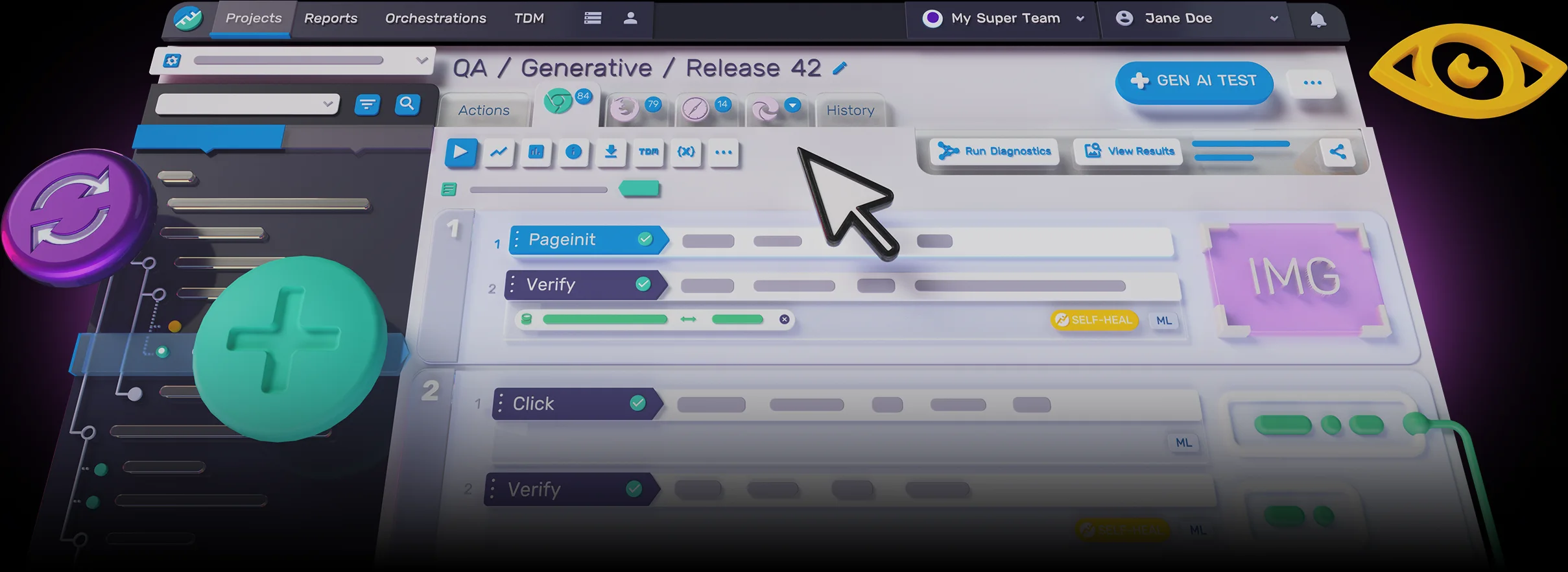
Key features include: Functionize’s Agentic Automation Platform, Traceability & Observability, Tracking real user behavior, Seamless device compatibility, Automation Beyond the Interface, Every device scenario covered, Visual validation with human-like perception, Cover diverse data-driven scenarios.
Functionize is commonly used for: Automated regression testing for web applications, Performance testing across multiple devices and browsers, User experience testing through real user behavior tracking, Continuous integration and deployment with automated workflows, Visual validation of UI elements for consistency, Data-driven scenario testing for complex applications.
Functionize integrates with: Jira, Slack, GitHub, CircleCI, Azure DevOps, Postman, Selenium, TestRail, Google Analytics, AWS.
Based on user reviews and social mentions, the most common pain points are: token usage, anthropic bill, token cost.

DEMO - Automating Failed Test Diagnosis and Maintenance with a Diagnostics Agent
Dec 16, 2025
Based on 215 social mentions analyzed, 7% of sentiment is positive, 92% neutral, and 1% negative.


