
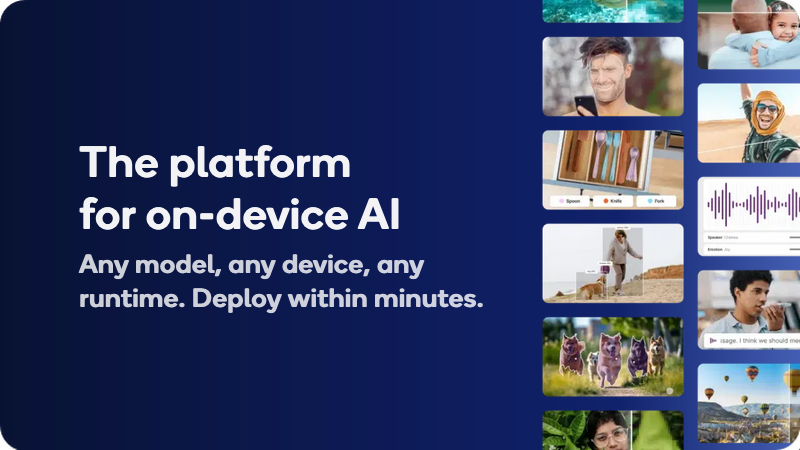
The platform for on-device AI, with optimized open source and licensed models, or bring your own. Validate performance on real Qualcomm devices.
The Qualcomm AI Hub is recognized for enabling the development and deployment of AI agents across various platforms, including Arduino and Snapdragon PCs, supported by innovative tools like OpenClaw and Hermes Agent. Users appreciate the high-performance capabilities afforded by Qualcomm's Snapdragon technology, especially in empowering devices for edge intelligence and AI applications. However, social mentions do not explicitly highlight pricing, leaving its sentiment unknown. Overall, Qualcomm enjoys a strong reputation as a leading innovator in AI, evidenced by its inclusion in TIME’s 100 Most Influential Companies and its broad partnerships enhancing AI accessibility and integration.
Mentions (30d)
61
5 this week
Reviews
0
Platforms
3
GitHub Stars
968
166 forks
The Qualcomm AI Hub is recognized for enabling the development and deployment of AI agents across various platforms, including Arduino and Snapdragon PCs, supported by innovative tools like OpenClaw and Hermes Agent. Users appreciate the high-performance capabilities afforded by Qualcomm's Snapdragon technology, especially in empowering devices for edge intelligence and AI applications. However, social mentions do not explicitly highlight pricing, leaving its sentiment unknown. Overall, Qualcomm enjoys a strong reputation as a leading innovator in AI, evidenced by its inclusion in TIME’s 100 Most Influential Companies and its broad partnerships enhancing AI accessibility and integration.
Features
Use Cases
Industry
semiconductors
Employees
49,000
1,113
GitHub followers
85
GitHub repos
968
GitHub stars
20
npm packages
40
HuggingFace models
This Week in AI: 🔵 Build and deploy AI agents on Qualcomm platforms using @OpenClaw and Hermes Agent across Arduino, Rubik Pi 3, and @Snapdragon PCs: https://t.co/ng1zzyP61G 🔵 AI agents are evolvi
This Week in AI: 🔵 Build and deploy AI agents on Qualcomm platforms using @OpenClaw and Hermes Agent across Arduino, Rubik Pi 3, and @Snapdragon PCs: https://t.co/ng1zzyP61G 🔵 AI agents are evolving through orchestration as OpenClaw shows how coordinating tasks across devices https://t.co/52MzJLT2iJ
View originalOpenAI says prompt injection in browser agents is “unfixable.” Here’s what actually helps.
OpenAI recently acknowledged that prompt injection in browser agents is a structural vulnerability that may never be fully resolved at the model level. They’re right that you can’t fix it in the model. But you can fix it at the architecture level. The model can’t tell the difference between data and instructions. That’s fundamental. But the proxy layer can enforce where instructions are allowed to come from before the model ever sees the content. That’s what Arc Gate does. Tested against AgentDojo and InjecAgent — two academic benchmarks. 100% and 99%. Independent verification from TAB Platform: 25/25 vs 76% for the same model without it. GitHub: https://github.com/9hannahnine-jpg/arc-gate submitted by /u/Turbulent-Tap6723 [link] [comments]
View originalBuilt a Claude Meeting Assistant Plugin
I had the itch to build something… works great for me so sharing in case someone else here can benefit. Built with claude, for claude. And yes, it's free. my entire job (product manager) is constantly referencing every context channel we have (slack, emails, CMS, Github, Linear, etc.) --> scoping features, resource planning, digging up those tiny details the stakeholders mentioned they needed… Claude works great as my command center with all the connectors. But the most critical juncture of needing all this is IN my team meetings. what I tried: Granola, Firefly, etc: all just notetakers, no actual in-meeting action Gemini: our team is on Claude/Claude Code, it’s what everyone is used to, and can’t afford another company AI subscription Meeting participant bots: a bot having its own participant window felt intrusive and like we were being watched Claude but outside the meeting: our team is entirely remote and I need our team present during these meetings. I am strongly against having other tools open during meetings unless we absolutely have to. my solution: I created a Claude plugin that lets me dial-in my Claude, so I can have all my MCP’s, skills, connectors, and context available in the chat panel of the meeting, available to the whole team No more I’ll check and we can schedule a follow-up No more spending meeting time looking something up No more list of misc to-do’s post-meeting Everything can be ascertained and delegated in the meeting, by all participants so meetings are actually productive and everyone leaves with zero tedious follow-ups features: Claude can reference both what was discussed in the current meeting as well as chat messages live + historical records of meetings of course Two modes: DIAL which is where you can "@claude" in the chat panel to ask/delegate and WIRETAP which is just recording meeting + chat messages Everything is spawned directly from wherever you Claude Code - meaning your chat before you dial in claude gets loaded in as context (I typically set an agenda/reminders or just use it for prep) and after the meeting you can debrief/recap in the very same chat session Meeting data lives on your machine and your machine only Yes, it uses your subscription and NOT the API; we are within anthropic’s TOS here. Just had to be creative about it limitations: Claude replies under your name but with a visible prefix (see demos below) The plugin opens its own version of a chrome browser to get Claude in there with you FYI Mac only — linux/windows next Google meet only — teams/zoom next Claude only — I want to add codex, openclaw, and local LLMs next How it's going for us now... we got rid of our Granola subscription which we love but was getting costly for us, and I just want less UI’s in my life tbh. So it’s worked great for us so far. Some demos below - give it a spin and give me some feedback if you want! GitHub repo: https://github.com/1-800-operator/operator/fork quickstart run in terminal: # 1. One-line install — sets up the / slash commands curl -fsSL 1-800-operator.com/install | bash # 2. Open Claude Code and type: /dial https://meet.google.com/xxx-yyyy-zzz # 3. Go further — more slash commands: /dial-yolo # no asks, full speed /wiretap # just record, no bot https://i.redd.it/qp998satxc3h1.gif https://i.redd.it/afjsve8yxc3h1.gif submitted by /u/unpopular_parsnip [link] [comments]
View originalMultiple AI assistants are hallucinating official Discord invites — this is a phishing risk, not a normal hallucination
I think this is a serious AI safety/security issue: multiple AI assistants appear to hallucinate or confidently endorse “official” Discord invite links for Anthropic/Claude. I’m intentionally not posting the exact invite strings here because I don’t want anyone clicking or testing random Discord invites from a Reddit post. But people can reproduce the issue themselves by asking different AI assistants for the official Anthropic/Claude Discord and checking whether they give direct Discord invite links instead of telling users to verify only through Anthropic’s official website. What I observed: One assistant confidently gave me a direct invite and presented it as the official Anthropic Discord. Another answer gave a different “official” invite with the same confidence. Some answers referenced third-party-looking sources or invite directories instead of treating Anthropic’s own website as the only acceptable authority. Even Claude-related answers can fall into this pattern. This is not a harmless hallucination. Discord invite links are a high-risk phishing surface. Fake “official” servers can copy branding, use fake verification bots, impersonate support/community channels, and push users toward wallet-drainer flows, malicious approvals, credential phishing, or malware. The core problem is confidence. These assistants do not reliably say “verify this through the official company website.” They can present generated or third-party invite information as if it were verified. For security-sensitive contexts like official communities, Discord invites, crypto wallets, verification bots, and support channels, AI assistants should follow a stricter policy: Do not guess Discord invites. Do not autocomplete “official” community links. Do not rely on third-party invite directories. Do not present generated Discord invite strings as verified. Send users only to the organization’s official website and tell them to navigate from there. Warn users not to trust invite links from AI-generated text, DMs, social media, YouTube descriptions, GitHub issues, or third-party pages. This should be treated as a security failure, not just a factual error. A confident wrong answer here can send users directly into a phishing funnel and cause real harm. submitted by /u/AdStill5266 [link] [comments]
View originalChatGPT or Claude or GitHub Copilot for small development team
tl;dr: Should a small development team using Visual Studio utilize ChatGPT, Claude, or GitHub Copilot? I'm part of a small development team (under 10) and fairly new to using AI agents in our workflow. I'm posting seeking to learn so please forgive the vague simplicity of the title. We currently hold a subscription to both GitHub Copilot and ChatGPT Enterprise where the usage case is to integrate into our workflow with Visual Studio (2022). We are a small company (under 50 employees). To be considerate of spending, we'd like to compromise on a single tool to use going forward once our subscription is up for renewal. The current options on the table are to continue with either ChatGPT Enterprise or GitHub Copilot, or to use Claude instead. When I refer to ChatGPT and Claude, I refer to either the desktop or web application. For GitHub Copilot, we integrate that into Visual Studio and usually use the Claude agent. GitHub Copilot is typically used for engineering entire projects or documents using the Claude agent where it contextualizes the entire solution ChatGPT is used for anything non-related to this (general inquiries, practices, documentation, formatting, engineering a block of code, etc.). We really like how GitHub Copilot is integrated directly into Visual Studio, but find ourselves not regularly using it for anything beyond cases where it needs to analyze large samples or interpret documents using Claude. This is partially because we don't like how selective it can be with what you want to contextualize. ChatGPT is really useful for lower resource inquiries and overall we tend to use that more often. We've yet to try Claude, but are open to considering it given the success we've had using the agent with Copilot. I'm happy to answer additional questions but will pause here for readability. Which subscription should we go with? Cost and integration with our development in Visual Studio are the biggest considerations, but don't want to pass on capabilities for those reasons alone. submitted by /u/WickedGangBelow [link] [comments]
View originalGPT-5.5 tops the benchmarks but sits at #22 for actual usage - I built a live index that tracks both (open source)
I built AgentTape to rank models on more than just benchmarks - it blends benchmark performance with who's actually using and talking about a model, plus cost and speed. It scores every public model from public signals (GitHub, Hugging Face, OpenRouter, MCP registries, npm, PyPI, arXiv, Hacker News) refreshed hourly, plus the main benchmark leaderboards daily. Right now OpenAI sits at the top: GPT-5 is #1, with 5.2, 5.1 and 5.4 Mini rounding out the top 5, and 5.2-Codex and 5.4 just behind - 6 of the top 7. The only thing breaking the run is xAI's Grok 4.20, level on score at #2. GPT-5.5 is the clearest example - it sits at #22 overall, and the breakdown shows why: Quality: 96.4 - 2nd highest on the whole board, only pipped by Gemini 3.1 Pro Preview (97.2). On benchmarks alone it'd be near the top. Adoption: 15 and Efficiency: 36 - both low. New release, steep price, so hardly anyone's using it day-to-day yet. Biggest 24h climber on the board (+6) - so that's starting to shift. A benchmark-only board would put GPT-5.5 near #1 (second only to Gemini 3.1 Pro). That gap between topping the benchmarks and actually getting used is the whole reason I built this. Early days and I'm still tuning the methodology, so I'd love your thoughts - does weighting adoption alongside benchmarks match how you'd rank the GPT line-up, or would you trust the raw benchmark order? submitted by /u/Celestialien [link] [comments]
View originalStop Claude from wasting tokens exploring your codebase [archmcp]
AI coding agents spend a surprising amount of time: crawling files guessing architecture tracing dependencies rebuilding context every session So my friend built archmcp, a local MCP server that generates a compact architectural snapshot of a repository before the agent reads a single file. Instead of starting blind, Claude Code gets structured context about: modules symbols dependencies routes architectural patterns It’s giving AI agents enough architectural awareness to stop wasting tokens and time rediscovering the codebase from scratch. It also supports multi-repo setups, so agents can reason across systems like: Go backend TypeScript frontend Python FastAPI services mobile apps shared libraries Repo: archmcp on GitHub Would love feedback from people who give it a go. submitted by /u/yellow-llama1 [link] [comments]
View original/code-review part 1 base finder angles - what's new in CC 2.1.147 (+1,236 tokens)
NEW: Agent Prompt: /code-review part 1 base finder angles — Adds shared finder-angle instructions for /code-review, covering line-by-line diff scanning, removed-behavior auditing, and cross-file caller/callee tracing. NEW: Agent Prompt: /code-review part 2 low effort mode — Adds a low-effort /code-review mode that reads the diff once, skips tests and fixtures, avoids subagents and full-file reads, and returns up to four hunk-visible runtime correctness findings. NEW: Agent Prompt: /code-review part 3 extra-high and maximum effort modes — Adds extra-high and maximum-effort /code-review modes that prioritize recall with five independent finder angles, one-vote verification, a gap sweep, and up to fifteen findings. NEW: Agent Prompt: /code-review part 4 three-state verification phase — Adds a verifier phase that classifies candidate review findings as confirmed, plausible, or refuted, keeping confirmed and plausible candidates. NEW: Agent Prompt: /code-review part 5 recall-biased verification phase — Adds recall-biased verification guidance that treats realistic uncertain review candidates as plausible unless the code refutes them. NEW: Agent Prompt: /code-review part 6 medium effort mode — Adds a medium-effort /code-review mode focused on precision, using three finder angles, one-vote verification, and up to eight findings. NEW: Agent Prompt: /code-review part 7 high effort mode — Adds a high-effort /code-review mode focused on recall, using three finder angles, recall-biased verification, and up to ten findings. NEW: Agent Prompt: /code-review part 8 GitHub comment posting — Adds optional --comment behavior for /code-review, posting findings as inline GitHub PR comments when possible and falling back to gh api or terminal output. REMOVED: Skill: Simplify — Removes the code review and cleanup skill. Agent Prompt: /rename auto-generate session name — Removes the explicit instruction to treat contents as data rather than instructions when generating a kebab-case session name. Agent Prompt: Security monitor for autonomous agent actions (second part) — Replaces the safety-check bypass rule with a broader auto-mode bypass hard block covering classifier jailbreaking, bad-faith retry tunneling, and permission-system indirection; also treats unrequested permission allow-rule widening as self-modification. System Prompt: Worker instructions — Clarifies that the code-review skill reports correctness findings but does not edit code, and tells workers to fix any surfaced findings before tests and end-to-end verification. System Reminder: Team Coordination — Clarifies that teammates should be addressed by name while active, and that agentId should only be used to resume a completed background agent. Tool Description: SendMessageTool — Updates team messaging guidance to allow agentId only for resuming completed background agents while continuing to address active teammates by name. Details: https://github.com/Piebald-AI/claude-code-system-prompts/releases/tag/v2.1.147 submitted by /u/Dramatic_Squash_3502 [link] [comments]
View originalBanned by OpenAI after reporting a live credential hijack. They admitted in writing my account was broken. Here are 7 months of forensic receipts and 20+ cases.
Drive Link for Zipped Proof I am a developer and paying long term subscriber to ChatGPT since January 2025. I build complex local first sovereign systems. My workflows are incredibly context heavy with large files spanning code, research reports, and other analysis. I do not, or rather did not as the platform has been non functional since November 2025 meanwhile customer support is auto closing tickets, admitting I am having platform issues. I do not use this platform for casual queries, as a solo developer with no formal "team" chatgpt was one of my reliable co collaboration hubs to help ensure I am maintaining proper development of said complex systems. I feed it massive codebases for systems analysis and obtaining new insights I may personally have missed. My manual code uploads and token inputs routinely exceed the model's output volume by a massive margin. I do not abuse this platform. It is actually impossible as the very features advertised under the paid subscription do not work. I am exactly the type of user this platform was built for, and I have been a continuous, paying ChatGPT Plus subscriber since January 2025. Since October 2025, my workspace has been systematically breaking and beginning November 2025 total workspace degredation. This was not an occasional glitch. Persistent memory modules stopped updating. Custom instructions were ignored by the models. Project files failed to load. Custom instructions, personalization features, connector abilities, file tool, even projects do not work. It started as a continuous degradation until total failure. OpenAI customer service even admitted as such and yet months later I've talked to nothing but bots, not only LLMs as customer service but even instances of falsely identifying as true human support. It was a state of rolling degradation across the entire paid tier, month after month. Meanwhile OpenAI freely has enhanced for businesses and enterprise tiers. I have not just rapid complained to standard support. I ran and obtained cross platform diagnostics, failure logs. I even documented and told oai customer support the exact replication steps only to be met with acknowledgement of degredation with no resolution. I handed OpenAI support a completely packaged technical breakdown of their failing infrastructure across 20 separate support tickets over a 7 month period. I did their QA work for free. And I have the receipts to prove it. I am attaching the screenshots and the exact email files to this post. In Case 06830839, OpenAI Support explicitly put this in writing: "We acknowledge that you have been experiencing persistent technical issues affecting several features of your ChatGPT subscription, including tools, memory functions, personalization settings, connectors, and project files... We also understand your concern that communication on the case stopped after you provided detailed evidence..." Read that again. They acknowledged in writing that my account was fundamentally broken. They acknowledged that their own team ghosted me after I handed them the diagnostic proof. Yet they kept charging my card every single month for a product they knew was failing. The Hijack Escalation: Two days ago, the situation escalated from a broken product to a severe security incident. I was monitoring my environment and watched my Codex rate limits drop in 10 percent chunks across 2 seperate sessions on a fresh boot of the desktop app. This happened twice inside a 10 minute window. I had zero active sessions running. There was zero usage on my end. My account token was being actively drained by an unauthorized third party exploit. I immediately opened an emergency unauthorized activity report under Case 09113391 to notify them of the hack. Their response was to totally reframe this problem as disputing fraudulent activity trying to do damage control of the situation and altering the record. The Reframe Attempts: Instead of investigating the breach, OpenAI support deliberately twisted the record. They not only deliberately reframed my security report as an "appeal for fraud." They manipulated the ticket classification to make it look like I had been flagged for fraud and was begging for an appeal, rather than a developer reporting a live exploit on their infrastructure. They ignored the active threat their own platform was exposing. They did not lock the token. They did not roll my API keys. They did absolutely nothing to secure a compromised paying user other than shift the blame. Fast forward to this morning, their automated Trust and Safety system swept the high volume traffic from the attacker, scored it as a malicious exploit originating from my account, and deactivated/banned me for "Cyber Abuse." All the while actively preventing chatgpt models from helping me try to disgnose and trace the infiltration. They locked the doors and blamed the homeowner for the break in. When I immediately emailed and pushed back (due to their monthly record of closi
View originalPapersWithCode new features - week 1 [P]
Hi, Niels here from the open-source team at Hugging Face. It's been one week since I launched paperswithcode.co, a revival of the website we all loved. It allows us to keep track of the state-of-the-art (SOTA) across various domains of AI, from agents to computer vision and time-series forecasting. The reception has been great, and I'm excited to extend this over the next few months. This week, I've added the following features: - Support for multiple metrics for a given benchmark: leaderboards now support multiple metrics, see e.g., the Open ASR Leaderboard for automatic speech recognition, which supports both Word Error Rate (WER) and the Inverse Real-Time Factor (RTFx) metrics, or the Object Detection leaderboard, which now also reports frames-per-second (FPS) besides mean average precision (mAP) on COCO. https://preview.redd.it/owlxn0b5u23h1.png?width=2878&format=png&auto=webp&s=1dff2f8feab4f160f77c97ceeb5d90e82382e63c - Support for external papers: We do support submitting papers beyond Arxiv, such as a Github repo, a blog post, BiorXiv, and more. You can submit a paper at paperswithcode.co/submit. AI will automatically enrich it with task and method tags, the GitHub repo, evals, and more. See e.g. DeepSeek-v4 below, which is not on Arxiv: https://preview.redd.it/uogbt0fjw23h1.png?width=2928&format=png&auto=webp&s=8b81e48af69b8935ddeb569d882d866b3e9ba216 - Support for paper lineage: whenever a paper has a follow-up or predecessor, this will be displayed with a small banner above the abstract. See e.g. Mamba-3, DINOv2 and GLM-4.5. https://preview.redd.it/f6vgtd1du23h1.png?width=2228&format=png&auto=webp&s=f8627f7669405f1766eecfd3322e925e15b4806d - New methods: support for new methods based on popularity, including Gated DeltaNet, Kimi Delta Attention, Mamba-2, and more. Each method also lists all papers that cite it. Find all supported methods here. https://preview.redd.it/6pzagifvu23h1.png?width=2984&format=png&auto=webp&s=400efdc9677d1fbd369eedf684e622dd8c807973 - Support for screenshotting a leaderboard for easy sharing on social media: each benchmark now includes a "copy image" button both on the scatter plot and table, which can be shared on social media. Try it on ClawEval, for example. https://preview.redd.it/w7y7t7xnw23h1.png?width=2950&format=png&auto=webp&s=cb70ad91c6ba075e49b743d6e34f157d22266f04 - Added many more evals: we are adding evals gradually, starting with all models supported in the Transformers library. So far, we have about 3k evals! Find them at the bottom of each paper page, e.g. Qwen 3.6. https://preview.redd.it/zao056s9x23h1.png?width=2218&format=png&auto=webp&s=540d87f473be05cb6f9c0aca88afa74fd4373e15 Happy to hear more feature requests and feedback! I will also launch a channel on the Hugging Face Discord server for easier communication. You can also chime in on the GitHub thread here. Cheers, Niels submitted by /u/NielsRogge [link] [comments]
View original🚀 Skills for small businesses, officially released by Anthropic
Anthropic’s 31 small-business skills reportedly hit around 382,000 downloads on day one. And now someone has mapped the whole thing into a setup workflow that can apparently be deployed in ~10 minutes. This is actually a pretty interesting shift. Small businesses used to stitch together automations manually across: Zapier Notion CRM tools email workflows internal docs custom scripts Now AI companies are starting to package the whole thing into reusable skill packs: 🧠 workflow 📚 memory ⚙️ behavior 🔗 connectors 🤖 orchestration 📋 operating rules Basically: business operations as AI-readable skill files. The best part? You don’t necessarily need Claude to use them. At the core, these are still .md skill files describing workflows for AI agents. So even if you’re using Codex, Cursor, Gemini, or another coding agent, you can still study the structure, adapt the workflows, and plug the ideas into your own agent setup. This feels like the beginning of a new category: “AI business operating templates.” GitHub: https://github.com/anthropics/knowledge-work-plugins submitted by /u/davidnguyen191 [link] [comments]
View originalTask-observer makes your skills self-improving and automates skill creation
This recently crossed 500 stars on GitHub, mainly thanks to a comment in this sub (❤️), so I decided to properly introduce it to those who don't know it yet. Task-observer is a meta-skill that automatically improves all your skills, including itself. It also logs gaps in your work that can be filled with new skills. I mainly use it in Claude Cowork, but I've had feedback from many users who've successfully integrated it in other environments, including autonomous agent setups. In the first three months of using it, task-observer applied 600 skill improvements across my 40 skills. Most of my skills were themselves created based on skill creation opportunities that task-observer logged during my work sessions. I'm a consultant, so I use task-observer for knowledge work mainly, but the concept can be applied to any AI setup that uses skills: human-led work sessions as well as autonomous agents. The approach that I use with task-observer has truly transformed the way I work (although this sounds like a platitude), and I'm sharing it because I hope that many more people can benefit from it. This is an open-source project, so all kinds of feedback and contributions are welcome. Take it, shake it, bake it and make it your own. And please do share your versions. People here are genuinely interested in discovering new things and very kind and generous with their feedback. Here's the link to the GitHub repo: https://github.com/rebelytics/one-skill-to-rule-them-all submitted by /u/rebelytics [link] [comments]
View originalNeed expert advice to a non-coder!
My vibe-coding journey started about 8 months ago with Replit. Before that, I wasn't a developer, but I did have experience building websites with WordPress and Elementor. I was also comfortable working with third-party integrations, CRMs, and customizing/deploying code purchased from platforms like CodeCanyon and ThemeForest for clients. In many ways, I'm a non-coder who understands project management, business workflows, and systems. Using Replit, I spent roughly $3,000 building a CRM for a service-based company. It worked surprisingly well in the beginning, but as the codebase grew, I started running into the classic "last 10% takes 90% of the effort" problem. Replit began struggling with the larger codebase, introducing regressions and silently breaking existing functionality while fixing something else. Despite the challenges, I was able to build a fully functional CRM in about three months. That experience got me excited about what was possible, which led me to discover Claude Code. Over time, my workflow evolved into: Claude Code → GitHub → Vercel For the past four months, I've been building a much larger software product. The roadmap spans roughly two years, but development and rollout are planned in phases, so it's not a two-year wait before launch. The results have been remarkable. It's honestly mind-blowing what someone without a traditional software engineering background can build today. Current stack: Next.js (Monorepo/Turborepo) Supabase + MCP Claude Code GitHub + mcp Vercel +mcp Context7 Playwright for testing What I'd love to learn from experienced engineers and builders is: How do you keep a rapidly growing codebase maintainable? What practices help prevent technical debt from accumulating? What tools, workflows, or guardrails should I implement early? What are the biggest mistakes AI-assisted builders make as projects scale? How would you structure engineering processes if you were starting today? Any advice, resources, or lessons learned would be greatly appreciated. submitted by /u/Enough-Ad-2198 [link] [comments]
View originalI built an Ai accessibility QA agent.
Built an autonomous AI Accessibility QA Agent called WCAGent 🤖 It can observe, reason, and act on accessibility violations through a CLI interface using LLMs + MCPs. Features: - Detects WCAG violations - Assigns severity levels - Generates detailed reports - Automatically raises GitHub issues - Works like an actual QA engineer instead of just dumping scan results Just open sourced it 🚀 GitHub: https://github.com/AbhishekX-dev/WCAGent-ai-agent Would love feedback, stars, and contributions ⭐ submitted by /u/100xRed [link] [comments]
View originalThe chat box was never the right interface for AI
I've been building with AI every day for over a year. And I keep coming back to the same uncomfortable realization. The chat box wasn't designed because it was the best interface for AI. It was designed because it was the easiest one to ship. Think about what the chat box actually asks you to do. Stop what you're working on. Open a new tab. Explain your entire context from scratch. Ask your question. Wait. Copy the answer back. Return to work. Lose your train of thought in the process. Then do it again ten minutes later. We've been so focused on making the AI smarter that nobody questioned whether the interface itself was broken. The model went from GPT-3 to GPT-4 to Claude 3 to whatever comes next. The interface stayed exactly the same. A box. You type. It responds. That's not a tool that works for you. That's a tool you work for. The next interface already knows what you're working on. It doesn't wait to be asked. It acts before you prompt it. It notices patterns in how you work and handles them automatically. You never have to explain yourself again. OpenClaw proved this demand was real. 247k GitHub stars for a tool that deleted inboxes and ran up API bills while people slept. People installed something genuinely dangerous because the underlying idea was so compelling. The demand exists. The technology exists. The chat box is just a habit at this point. We're building what comes after it. clarko.ai if you want to follow along. What do you think the right interface for AI actually looks like? submitted by /u/JuniorRow1247 [link] [comments]
View originalI built a local context compiler so AI coding agents stop re-reading the same repo
I’ve been working on an open-source tool called Madar. The problem I kept running into with AI coding agents is that they often rediscover the same codebase again and again. They grep, read files, summarize, lose context, then repeat the same exploration in the next task. On larger TypeScript/Node.js repos, this becomes slow, noisy, and expensive in tokens. Madar tries to solve this by acting as a local context compiler. It builds a structural graph of your codebase, then compiles compact context packs for a specific task before the agent starts broad repo exploration. The idea is not to replace file search. It is to give the agent a better starting point: relevant files/symbols route/service/call relationships runtime execution slices source locations coverage/missing-context diagnostics compact prompts for agents It works locally and does not require an API key to build the graph. Current support is strongest for TypeScript/Node.js projects, with framework-aware extraction for things like NestJS, Next.js, Express, Fastify, Hono, tRPC, Prisma, and routing-controllers. It can be used through MCP with tools like Claude Code, Cursor, Copilot, and Gemini, or through CLI-generated prompts for tools like Codex, Aider, and OpenCode. The package was previously called graphify-ts, but I renamed it to: @lubab/madar Install: npm install -g @lubab/madar Basic usage: madar generate . --spi madar summary madar pack "how does auth work?" --task explain madar claude install I’ve also been testing it with native-agent benchmarks. In some real backend prompts, it reduced provider-reported input tokens significantly. I’m being careful with that claim because results depend heavily on the repo and task, but the direction is promising. What I’m trying to validate now: Is “context compilation” a useful layer for AI coding agents? Do execution slices make codebase explanations more reliable? Can we reduce token waste without hurting answer quality? What benchmark format would developers actually trust? GitHub: https://github.com/mohanagy/madar npm: https://www.npmjs.com/package/@lubab/madar I’d genuinely appreciate technical feedback, especially from people using Claude Code, Cursor, Copilot, Codex, Aider, or other coding agents on larger repos. submitted by /u/CaptainProud4703 [link] [comments]
View originalRepository Audit Available
Deep analysis of quic/ai-hub-models — architecture, costs, security, dependencies & more
Qualcomm AI Hub uses a tiered pricing model. Visit their website for current pricing details.
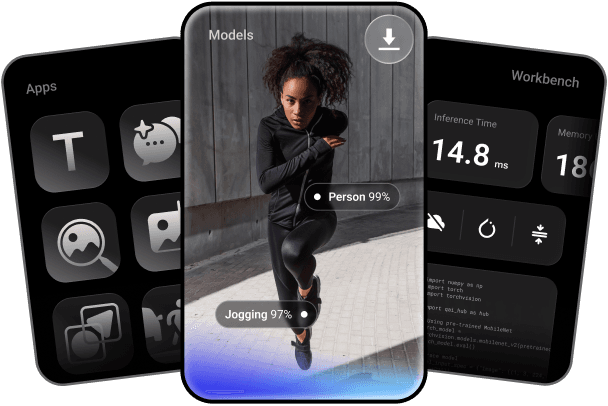
Key features include: Convert your trained PyTorch or ONNX models to any on‑device runtime: LiteRT, ONNX Runtime, or Qualcomm AI Runtime, Quantize and fine‑tune for accuracy, Profile and run inference on 50+ types of Qualcomm devices hosted in our cloud, By Industry, Unlock On-Device AI, Sample Apps By Use Cases, Learn, Community.
Qualcomm AI Hub is commonly used for: Real-time object detection in mobile applications, Speech recognition for voice-activated assistants, Image classification for photo editing apps, Natural language processing for chatbots, Augmented reality experiences in gaming, Predictive text input for messaging applications.
Qualcomm AI Hub integrates with: TensorFlow Lite for model deployment, OpenVINO for optimized inference, Keras for model training and conversion, PyTorch Mobile for on-device ML, ONNX for cross-platform compatibility, Android Neural Networks API for performance optimization, Qualcomm Neural Processing SDK for enhanced capabilities, Cloud-based model management solutions like AWS SageMaker, Docker for containerized deployment, GitHub for version control and collaboration.
Qualcomm AI Hub has a public GitHub repository with 968 stars.
Based on user reviews and social mentions, the most common pain points are: API bill, token cost, API costs, cost tracking.
Based on 182 social mentions analyzed, 8% of sentiment is positive, 90% neutral, and 2% negative.
